


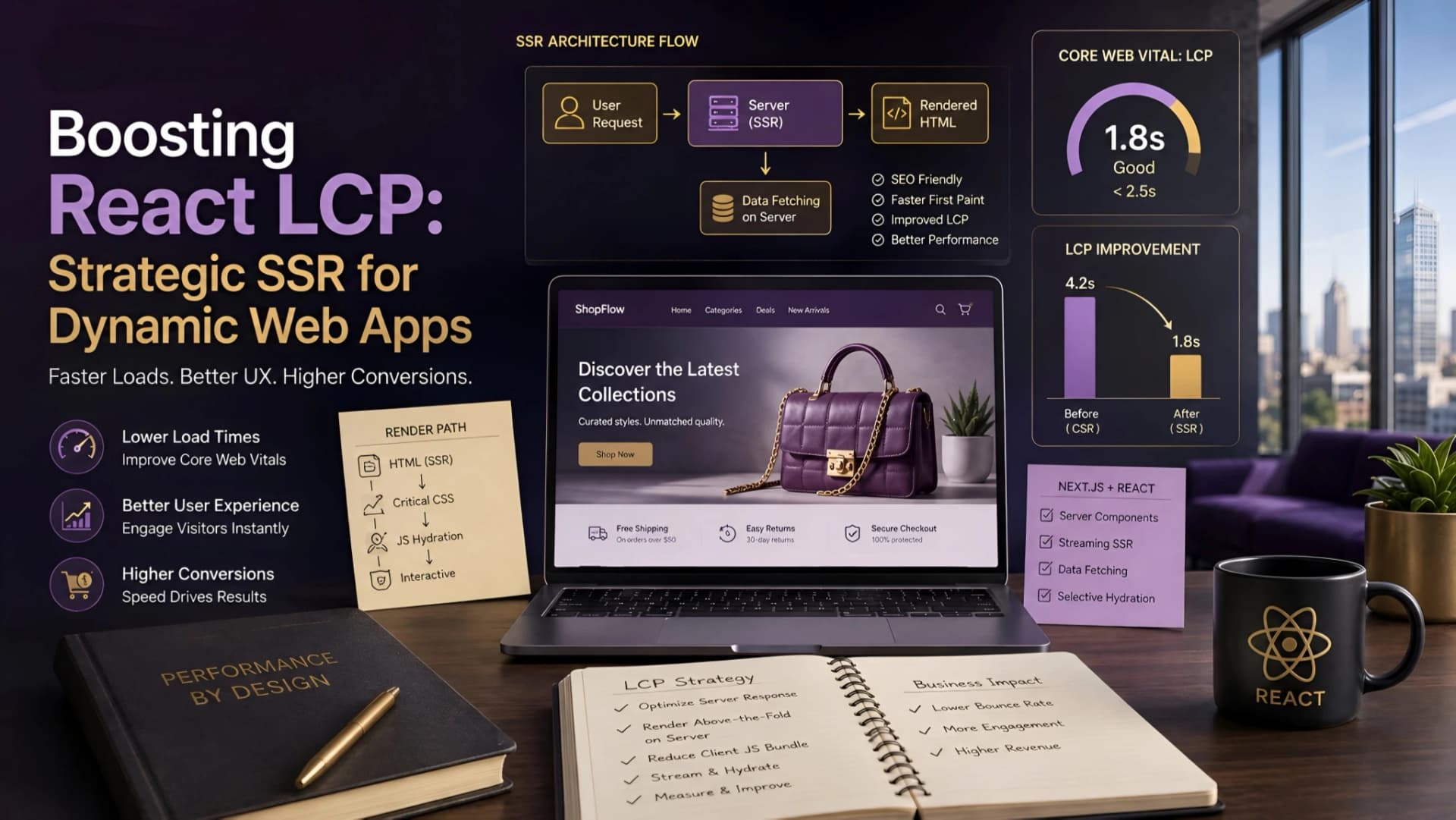
The Largest Contentful Paint (LCP) metric is a critical component of Core Web Vitals, directly impacting user perception and search engine visibility. For dynamic React applications, especially those relying heavily on client-side rendering (CSR), achieving a strong LCP score can feel like an uphill battle.
Users often experience a blank screen or a slow-loading hero section, which frustrates them and signals to search engines that the page isn't ready. This isn't just a technical detail; it's a direct blow to user experience and a subtle barrier to discoverability.
The LCP Challenge in Client-Side Rendered React Apps
Client-side rendering (CSR) means the browser receives a minimal HTML file and then fetches JavaScript to build the entire page. This process delays the rendering of meaningful content, often pushing the LCP element's appearance far down the timeline.
The browser has to download, parse, and execute all the JavaScript before it can even begin to paint the main content. This inherent delay is a primary reason why many dynamic React applications struggle with poor LCP scores right out of the gate.
Why Server-Side Rendering (SSR) is a Game Changer for LCP
Server-Side Rendering (SSR) fundamentally changes this dynamic. With SSR, the server pre-renders the initial HTML of a page, including its critical content, before sending it to the browser.
This means the browser receives a fully formed HTML document that it can immediately paint to the screen. The user sees meaningful content much faster, significantly improving the perceived load time and often boosting the actual LCP score.
At Muhyo Tech, we often advocate for SSR in scenarios where initial page load speed and search engine crawlability are paramount. It's not just about rendering; it's about delivering a usable experience as quickly as possible.
Identifying the Largest Contentful Paint Element
Before optimizing, you need to know what you're optimizing. The LCP element is typically the largest image, video, or block of text visible within the viewport when the page first loads.
Tools like Chrome's Lighthouse or PageSpeed Insights will identify this element for you. Understanding which specific element is designated as LCP is the first critical step in any optimization effort.
Common LCP Bottlenecks in React SSR Applications
Even with SSR, LCP can still suffer if not implemented carefully. Hydration, for instance, can introduce delays.
Hydration is the process where React attaches event listeners and makes the server-rendered HTML interactive, and if this process is heavy or delayed, it can block the main thread and impact LCP or subsequent interactivity.
Key Bottlenecks:
- Slow Server Response Times: If the server takes too long to generate the HTML, the initial bytes arrive late.
- Large HTML Payloads: Even server-rendered HTML can be excessively large, slowing down download times.
- Unoptimized Images: LCP is often an image. If it's not optimized or loaded efficiently, it will bottleneck.
- Render-Blocking Resources: Unnecessary CSS or JavaScript files that block the browser from painting the initial content.
- Heavy Hydration: Complex client-side JavaScript that takes a long time to execute after the initial render, blocking interactivity and potentially LCP.
Strategic SSR Implementation for LCP Boost
Implementing SSR strategically involves more than just flipping a switch. It requires careful consideration of what content needs to be server-rendered and how to deliver it efficiently.
The goal is to provide a fast initial paint without overloading the server or delaying hydration unnecessarily.
1. Prioritize Critical Content for Server Rendering
Focus SSR efforts on the content that will likely be the LCP element. This includes hero images, main headings, and primary calls to action.
Not every component needs to be server-rendered; selectively rendering only the most critical parts can significantly reduce server load and improve time to first byte.
2. Optimize Image Loading and Delivery
Since images are frequently LCP elements, their optimization is paramount. Use modern image formats like WebP, implement responsive images with srcset, and lazy-load images that are below the fold.
For the LCP image itself, ensure it's preloaded using <link rel="preload"> and consider inlining small, critical images as data URIs to avoid additional network requests.
3. Critical CSS and Resource Prioritization
Extracting and inlining critical CSS directly into the HTML head prevents render-blocking external stylesheets. This ensures the browser can paint the styles for the LCP element immediately.
Similarly, defer non-critical JavaScript until after the initial render or use async and defer attributes. This ensures the main thread is free to render the LCP content.
4. Data Prefetching and Caching
For dynamic data-driven applications, prefetching data on the server side before rendering the HTML can dramatically reduce LCP. The server can fetch necessary API data and embed it directly into the HTML payload, eliminating client-side data fetching delays.
Implement robust caching strategies for both server-rendered HTML and API responses to minimize redundant computations and accelerate delivery.
Next.js and Other React SSR Frameworks: Best Practices
Frameworks like Next.js simplify SSR implementation considerably. They offer built-in features that align perfectly with LCP optimization goals.
Next.js Specific Strategies:
getServerSideProps: Use this for pages requiring dynamic data that must be fetched at request time. This ensures the data is available for server rendering.getStaticPropswithrevalidate: For content that changes less frequently, pre-render pages at build time or incrementally. This offers the performance benefits of static sites with the freshness of dynamic content.- Image Optimization: Next.js's
<Image>component automatically optimizes images, lazy loads, and serves them in modern formats. Ensure the LCP image is explicitly marked withpriority. - Font Optimization: Next.js provides tools to optimize web fonts, preventing render-blocking font downloads.
Tradeoffs and Considerations
While SSR offers significant LCP benefits, it's not without its tradeoffs. Server-side rendering increases server load and operational costs, as the server is doing more work per request.
There's also a potential for increased complexity in the development workflow, especially when managing data fetching and hydration.
| Feature | Pros | Cons |
|---|---|---|
| Server-Side Rendering (SSR) | Faster LCP, improved SEO, better initial user experience | Increased server load, higher hosting costs, potential for hydration issues |
| Client-Side Rendering (CSR) | Simpler development, reduced server load (after initial load), rich interactivity | Slower LCP, poor SEO without careful implementation, blank screen initial load |
| Static Site Generation (SSG) | Fastest LCP, high security, minimal hosting costs, excellent SEO | Less suitable for highly dynamic, real-time content, requires re-deployment for content updates |
| Incremental Static Regeneration (ISR) | Combines SSG speed with dynamic content updates | More complex caching strategy, potential for stale content during revalidation |
Muhyo Tech's Approach to LCP Optimization
Our approach at Muhyo Tech involves a careful balance of these strategies. We don't blindly apply SSR to every project; instead, we analyze the specific needs of each application.
For an e-commerce platform, fast LCP on product pages is non-negotiable for conversion. For a highly interactive dashboard, we might prioritize initial interactivity over raw LCP, while still ensuring critical elements appear quickly.
We focus on diagnosing the actual LCP bottleneck using real-world data and then applying the most effective, least complex solution. This might involve selective SSR, aggressive image optimization, or a combination of prefetching and critical CSS.
Impact on Business Value
Improving LCP directly translates to tangible business value. A faster-loading page reduces bounce rates, as users are less likely to abandon a site that loads quickly.
Enhanced user experience leads to higher engagement and satisfaction, fostering trust. From a search engine perspective, a strong LCP score contributes to better crawlability and indexation, potentially improving organic visibility for critical pages.
For businesses, this means more eyeballs on their content, smoother user journeys, and ultimately, a stronger foundation for conversion.
Architectural Checklist for Optimal LCP with SSR
- Identify LCP Element: Use Lighthouse to pinpoint the LCP element for each critical page.
- Server-Side Render Critical Content: Ensure the LCP element and its surrounding context are part of the initial server-rendered HTML.
- Optimize LCP Image/Video: Use responsive images, modern formats (WebP), and preload the LCP asset.
- Inline Critical CSS: Extract and inline styles necessary for the LCP element's immediate rendering.
- Defer Non-Critical JS/CSS: Use
async/deferor dynamic imports for scripts and styles not essential for initial paint. - Data Prefetching/Caching: Fetch data on the server and embed it, or use robust caching for API responses.
- Minimal Hydration: Keep the client-side JavaScript bundle as small as possible to speed up hydration.
- Server Response Time: Optimize backend logic and database queries to ensure a fast Time To First Byte (TTFB).
- CDN Usage: Distribute static assets and server-rendered content via a CDN to reduce latency.
- Monitor LCP Regularly: Implement real user monitoring (RUM) to track LCP in the wild and identify regressions.
Frequently Asked Questions
How do I identify the LCP element in a React SSR application?
You can use tools like Google Lighthouse, PageSpeed Insights, or Chrome DevTools' Performance tab. Run a performance audit, and the LCP element will be highlighted, usually a large image, video, or block of text.
What are common LCP bottlenecks specific to React SSR?
Beyond general performance issues, SSR can suffer from slow server response times, heavy HTML payloads, and delayed hydration. If the client-side JavaScript bundle is too large, hydration can block the main thread and delay interactivity even after the initial paint.
How does hydration affect LCP in server-rendered React apps?
While SSR delivers a fast initial paint, hydration is where React takes over the server-rendered HTML and makes it interactive. If this process is resource-intensive or takes too long, it can delay the Time to Interactive (TTI) and sometimes even impact LCP if the LCP element isn't fully stable until hydration completes.
What are the best practices for optimizing LCP in Next.js or other React SSR frameworks?
For Next.js, utilize getServerSideProps or getStaticProps for pre-rendering, use the built-in Image Component with priority for LCP images, and optimize fonts. Generally, focus on inlining critical CSS, preloading LCP assets, and minimizing client-side JavaScript bundles to speed up hydration.