


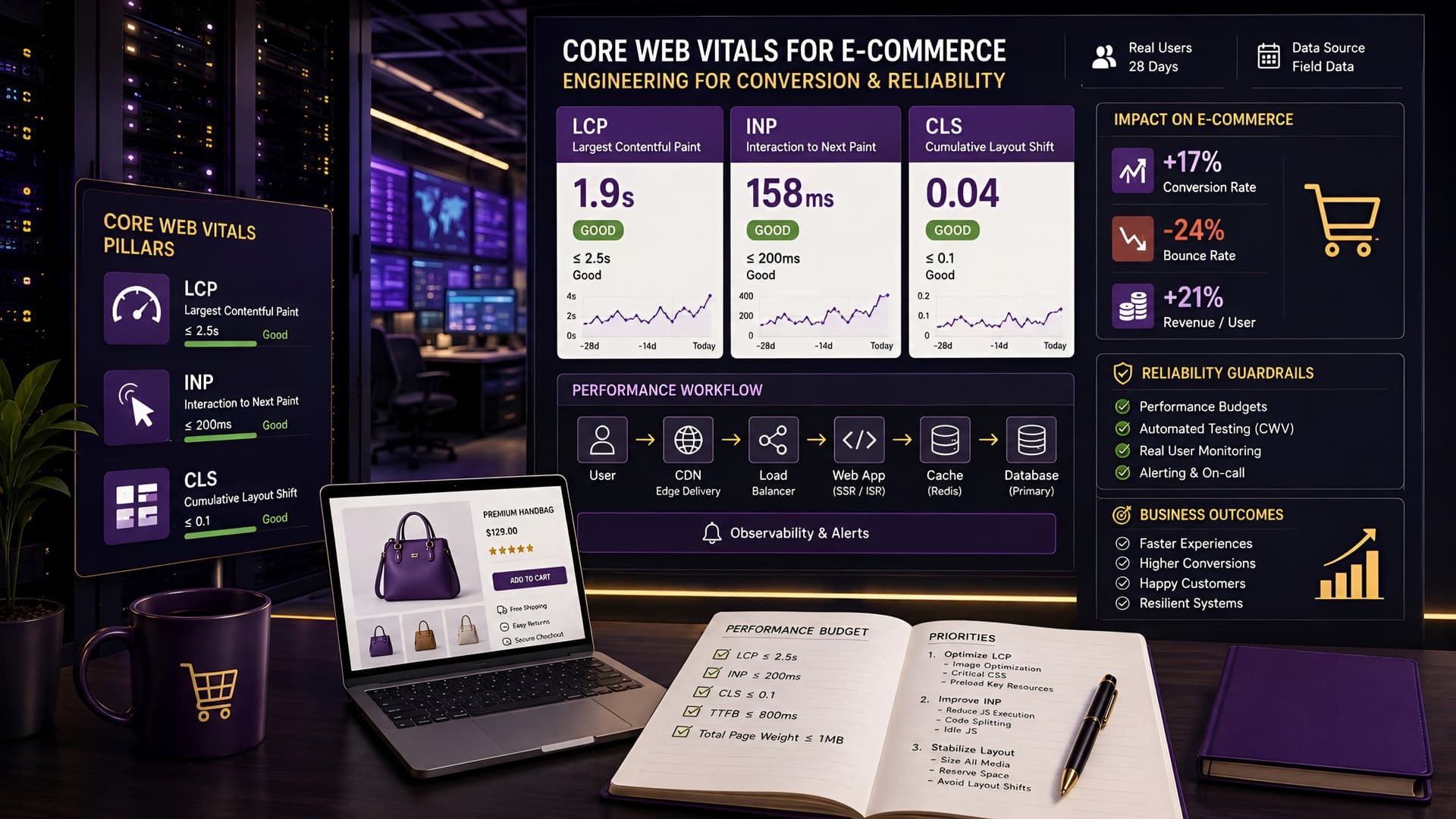
E-commerce success hinges on many factors, but few are as fundamental yet often overlooked as Core Web Vitals (CWV). These metrics—Largest Contentful Paint (LCP), Cumulative Layout Shift (CLS), and First Input Delay (FID), soon to be Interaction to Next Paint (INP)—directly measure user experience on your site.
Ignoring them can lead to frustrated shoppers, higher bounce rates, and missed sales opportunities. For e-commerce platforms, optimizing CWV isn't just about SEO; it's about engineering a seamless, trustworthy shopping journey that converts.
Understanding Core Web Vitals in an E-commerce Context
Core Web Vitals are Google's way of quantifying the user experience of a webpage. They reflect real-world user interaction and visual stability, which are particularly critical for e-commerce sites where every millisecond can impact a purchasing decision.
Poor CWV scores signal a sluggish or unpredictable experience, eroding user trust and potentially pushing customers to competitors. Our approach at Muhyo Tech involves treating these metrics as engineering specifications, not just SEO checkboxes.
Largest Contentful Paint (LCP): The 'Loading Speed' Metric
LCP measures when the largest image or text block in the viewport becomes visible. For an e-commerce product page, this is often the main product image, a hero banner, or a prominent product description.
A high LCP means users are waiting too long to see the primary content they came for. This waiting period often translates to impatience and abandonment, directly affecting potential conversions.
Cumulative Layout Shift (CLS): The 'Visual Stability' Metric
CLS quantifies unexpected layout shifts during page loading. Imagine clicking 'Add to Cart' only for the button to suddenly move because an ad or image loaded above it.
This frustration is precisely what CLS measures, and it's a conversion killer on product pages, checkout flows, and category listings.
First Input Delay (FID) & Interaction to Next Paint (INP): The 'Responsiveness' Metrics
FID measures the delay from when a user first interacts with a page (e.g., clicks a button) to when the browser is actually able to process that interaction. While FID focuses on the first interaction, INP (replacing FID in March 2024) expands this to measure the latency of all interactions that happen during a user's visit to a page.
For e-commerce, this impacts critical actions like filtering products, adding items to a cart, or navigating the checkout process. A slow response means a broken user flow and likely lost sales.
Common E-commerce Performance Pitfalls
E-commerce sites, by their nature, often struggle with Core Web Vitals due to a unique set of challenges. Understanding these common pitfalls is the first step towards effective optimization.
We often find these issues compound, creating a domino effect of poor performance. Addressing them requires a systematic engineering approach.
Third-Party Scripts & Bloat
Marketing tags, analytics platforms, chat widgets, payment gateways, and review plugins are essential for e-commerce but frequently introduce significant performance overhead. Each script adds to download time and can block the main thread.
The cumulative effect of dozens of these scripts often cripples page load times and responsiveness, impacting LCP and INP significantly.
Unoptimized Images & Media
High-resolution product images are vital for showcasing items, but improperly optimized images are a primary culprit for poor LCP. Large file sizes, incorrect formats, and lack of responsive images mean unnecessary data transfer.
Carousels and galleries, while visually appealing, often load too many images upfront, further delaying critical content.
Inefficient CSS & JavaScript Delivery
Bloated CSS and JavaScript files, especially those not optimized for critical rendering path, can block page rendering. Unused CSS or JavaScript, or large bundles, force the browser to do more work than necessary.
This directly impacts LCP and can also cause layout shifts if styles load late, contributing to a poor CLS score.
Server-Side Performance & Database Queries
Even front-end optimizations can't fully compensate for a slow backend. Complex database queries for product listings, inventory checks, or personalized recommendations can delay the initial server response time (TTFB).
A high TTFB impacts LCP because the browser waits longer to receive the first byte of HTML, delaying the entire rendering process.
Diagnosing Core Web Vitals Issues
Before optimizing, you need to accurately diagnose where the problems lie. We rely on a combination of field data and lab tools to get a complete picture.
This dual approach helps identify both real-world user experiences and reproducible issues under controlled conditions.
Using Google PageSpeed Insights & Lighthouse
PageSpeed Insights (PSI) provides both field data (from Chrome User Experience Report - CrUX) and lab data (Lighthouse analysis). It's your first stop for a quick overview.
PSI highlights specific CWV issues and offers actionable recommendations for improvement, often pinpointing exactly where LCP, CLS, or INP are struggling.
Chrome DevTools Performance Tab
For deep dives, Chrome DevTools' Performance tab is indispensable. It allows you to record a page load and visualize the entire rendering process, identifying bottlenecks in JavaScript execution, network requests, and layout shifts.
This tool helps engineers pinpoint specific code causing issues, offering a granular view of critical rendering path problems.
Web Vitals Extension & Other Monitoring Tools
The Web Vitals Chrome extension provides real-time CWV feedback as you browse, which is excellent for identifying issues during development or quality assurance. For ongoing monitoring, tools like Google Search Console, Semrush, or third-party RUM (Real User Monitoring) solutions provide continuous insights into your site's performance for actual users.
These monitoring tools are essential for tracking the impact of optimizations over time and catching new regressions quickly.
Engineering Strategies for Core Web Vitals Optimization
Effective CWV optimization requires a holistic engineering approach, tackling issues from server response to front-end rendering. Here are our core strategies.
We focus on sustainable solutions that improve performance without compromising functionality or maintainability.
Image Optimization & Responsive Media
- Lazy Loading: Implement lazy loading for images and iframes below the fold. This ensures only visible content loads initially, speeding up LCP.
- Responsive Images: Use
srcsetandsizesattributes to serve appropriately sized images for different screen resolutions. This prevents mobile users from downloading desktop-sized images. - Modern Formats: Convert images to modern formats like WebP or AVIF. These formats offer superior compression without significant quality loss, reducing file sizes drastically.
- Image CDNs: Leverage image Content Delivery Networks (CDNs) that automatically optimize and serve images from locations closer to your users, reducing latency.
Critical CSS & JavaScript Optimization
- Code Splitting: Break down JavaScript bundles into smaller chunks loaded on demand. This reduces the initial payload and speeds up interactive elements.
- Tree Shaking & Minification: Remove unused code and minify files to reduce their size. Build tools like Webpack or Rollup can automate this process.
- Defer & Async Loading: Use
deferandasyncattributes for non-critical JavaScript to prevent it from blocking the main thread and rendering. - Critical CSS Extraction: Identify and inline the CSS required for the initial viewport (critical CSS). Load the rest asynchronously to prevent render-blocking stylesheets.
Optimizing Third-Party Scripts
- Audit & Prioritize: Regularly audit all third-party scripts. Remove unnecessary ones and prioritize essential scripts based on their impact on user experience.
- Lazy Load & Defer: Whenever possible, lazy load or defer third-party scripts. For example, chat widgets can often be loaded only after a few seconds or user interaction.
- Self-Host When Possible: For certain static scripts (e.g., fonts, analytics, if allowed by vendor terms), self-hosting can offer more control over caching and delivery.
- Resource Hints: Use
<link rel="preconnect">and<link rel="dns-prefetch">to establish early connections to third-party domains, reducing connection overhead.
Server-Side & Backend Enhancements
- CDN Implementation: Utilize a CDN for all static assets (images, CSS, JS). This distributes content globally, reducing latency for users worldwide.
- Caching Strategies: Implement robust caching at various levels: browser caching, server-side caching (e.g., Redis, Varnish), and database query caching.
- Optimize Database Queries: Profile and optimize slow database queries, ensuring indexes are properly used and complex joins are minimized.
- Choose a Performant Hosting: Invest in high-quality hosting or cloud infrastructure that can handle e-commerce traffic spikes without performance degradation.
Addressing Cumulative Layout Shift (CLS)
CLS is particularly tricky for e-commerce sites due to dynamic content like banners, ads, and product recommendations. Here's how we tackle it.
Preventing unexpected shifts requires careful planning and precise dimensioning of elements.
Dimensioning Images & Iframes
Always specify width and height attributes for images and video elements. This allows the browser to reserve the necessary space before the content fully loads, preventing layout shifts.
Even with responsive images, explicit dimensions are crucial. For modern CSS, use aspect-ratio properties.
Avoiding Dynamic Content Injection Above Existing Content
Ads, cookie banners, or pop-ups that dynamically inject themselves at the top of the viewport after initial render are common CLS culprits. Reserve space for these elements or position them in a way that doesn't push existing content down.
Consider using sticky headers or modals that overlay content instead of pushing it.
Preloading Fonts & Preventing FOIT/FOUT
Web fonts often cause layout shifts when they load late, causing text to reflow (Flash of Unstyled Text - FOUT) or disappear (Flash of Invisible Text - FOIT). Use <link rel="preload"> for critical fonts.
Also, use font-display: swap; with careful fallback fonts to minimize visual disruption.
The Business Value of Core Web Vitals Optimization
Investing in Core Web Vitals optimization isn't just about technical compliance; it's a direct investment in your e-commerce platform's bottom line.
The impact extends far beyond a green score in PageSpeed Insights, touching conversion rates, customer loyalty, and long-term discoverability.
Increased Conversion Rates & Reduced Abandonment
A faster, more stable, and responsive website translates directly to a better user experience. Users are less likely to abandon carts when pages load quickly and interactions are instant.
Smoother navigation through product catalogs and checkout processes directly contributes to higher completed purchases and reduced frustration.
Improved Search Engine Visibility & Discoverability
Google has explicitly stated that Core Web Vitals are a ranking factor. While not the only factor, strong CWV scores contribute to overall page experience, which helps search engines favor your content.
Better visibility means more organic traffic, providing a sustainable channel for customer acquisition.
Enhanced Brand Reputation & Customer Loyalty
A fast, reliable e-commerce site builds trust. Customers perceive a well-performing site as professional and trustworthy, which encourages repeat visits and builds brand loyalty.
Conversely, a slow or buggy site erodes confidence and can quickly drive customers away, regardless of product quality or pricing.
Lower Operational Risks & Maintenance Costs
An optimized site is often a more robust and maintainable site. By cleaning up code, optimizing assets, and streamlining delivery, you reduce technical debt and potential points of failure.
This leads to fewer bug reports related to performance, easier updates, and lower long-term maintenance overhead, freeing up engineering resources for new features.
Core Web Vitals Optimization Checklist for E-commerce
| Category | Action Item | Impact |
|---|---|---|
| Images & Media | Implement lazy loading for off-screen images. | LCP, INP |
| Use responsive images (srcset, sizes). | LCP | |
| Convert images to modern formats (WebP, AVIF). | LCP | |
| Specify width/height for all images and iframes. | CLS | |
| CSS & JS | Minify and compress CSS/JS files. | LCP, INP |
| Defer non-critical JavaScript. | LCP, INP | |
| Extract and inline critical CSS. | LCP | |
| Implement code splitting for large JS bundles. | INP | |
| Third-Party Scripts | Audit and remove unnecessary scripts. | LCP, INP |
| Lazy load or defer non-essential third-party scripts. | LCP, INP | |
| Use preconnect/dns-prefetch for third-party domains. | LCP, INP | |
| Server & Backend | Implement a CDN for static assets. | LCP |
| Optimize server response time (TTFB). | LCP | |
| Apply robust caching strategies. | LCP, INP | |
| Optimize database queries. | LCP | |
| Layout Stability | Reserve space for dynamically injected content. | CLS |
| Preload critical web fonts. | CLS | |
| Avoid injecting content above the fold without space reservation. | CLS |
Tradeoffs and Ongoing Maintenance
Performance optimization is rarely a one-time fix. It's an ongoing process with inherent tradeoffs. Aggressive optimization can sometimes increase development complexity or limit third-party integrations.
We balance these factors, aiming for maximum performance within realistic operational constraints.
Monitoring and Alerting
Continuous monitoring of Core Web Vitals is crucial. Set up alerts for significant drops in performance metrics, allowing your team to react quickly to regressions introduced by new features or third-party updates.
Integrating RUM tools gives you a real-time pulse on your users' actual experience, which is invaluable.
Prioritizing User Flows
Not all pages are equally critical. Focus your most intensive optimization efforts on high-traffic, high-conversion pages: product pages, category listings, and the checkout flow.
While all pages should aim for good CWV, strategically prioritizing ensures the biggest business impact first.
Balancing Features and Performance
Every new feature or third-party integration adds potential performance overhead. Develop a culture where performance is considered a core requirement, not an afterthought.
Conduct performance impact assessments for new features and choose third-party solutions carefully, evaluating their performance implications.
Frequently Asked Questions
What are the biggest Core Web Vitals challenges for e-commerce?
The most significant challenges typically stem from unoptimized product images, excessive third-party scripts (analytics, marketing, payment widgets), and dynamic content causing layout shifts. These elements are often fundamental to e-commerce functionality, requiring careful integration and optimization.
How do Core Web Vitals affect my e-commerce SEO?
Core Web Vitals are a component of Google's 'page experience' ranking factor. While they won't single-handedly determine your search rankings, good scores contribute to overall page experience, which can positively influence visibility in search results and help your site rank more favorably compared to slower competitors.
Can I optimize Core Web Vitals without a complete site rebuild?
Absolutely. Many significant improvements can be made through targeted optimizations like image compression, lazy loading, critical CSS, and script deferment. A full rebuild is a last resort; focused engineering efforts can yield substantial gains without starting from scratch.
What's the difference between lab data and field data for CWV?
Lab data (e.g., from Lighthouse in PageSpeed Insights) measures performance in a controlled environment, useful for debugging. Field data (from Chrome User Experience Report) reflects real-world user experiences on your site. Both are important; field data shows what your actual users are experiencing, while lab data helps reproduce and fix issues.
Conclusion
Optimizing Core Web Vitals for an e-commerce platform is more than a technical exercise; it's a strategic imperative. It directly impacts your ability to convert visitors into customers, retain their loyalty, and maintain strong visibility in search engines.
By systematically addressing common performance pitfalls and implementing robust engineering solutions, you can build a faster, more reliable, and ultimately more profitable online store. At Muhyo Tech, we consistently integrate these performance principles into our e-commerce website development and website speed optimization services, ensuring our clients receive platforms engineered for success from the ground up.