


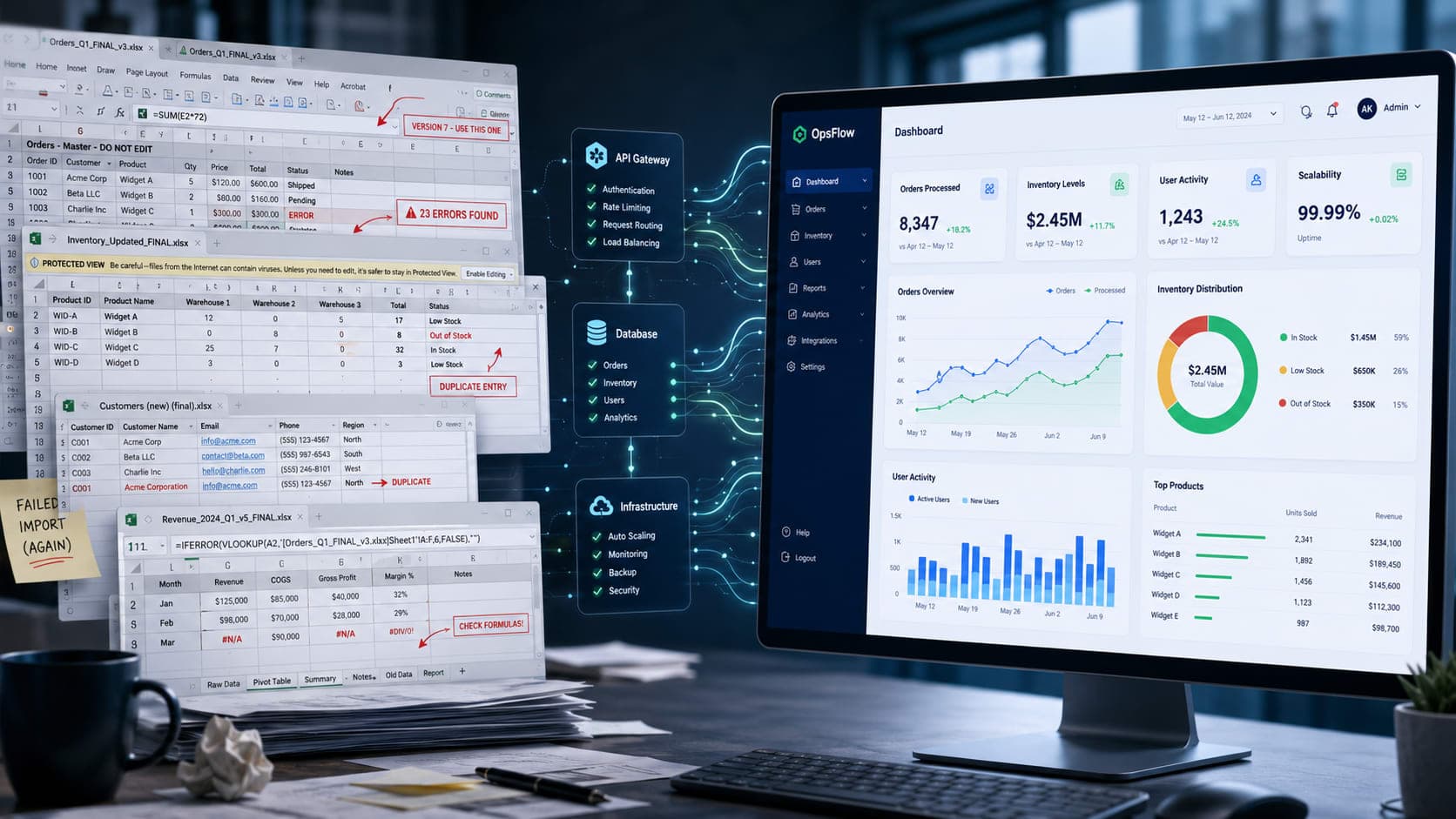
Every founder knows the feeling: that moment when the trusty spreadsheet, once a beacon of organization, transforms into a tangled web of errors and frustration. What started as a simple way to track orders, manage inventory, or monitor customer data suddenly becomes a bottleneck.
You find yourself spending more time cross-referencing tabs and debugging formulas than actually running your business. This isn't just an inconvenience; it's a silent drain on productivity, accuracy, and ultimately, your company's growth potential.
The Ticking Time Bomb of Manual Operations
Many businesses hit a critical juncture where manual processes, heavily reliant on spreadsheets, simply can't keep up. Data becomes inconsistent across different versions or shared drives, leading to costly mistakes and lost trust with customers.
Access control becomes a nightmare, with sensitive information potentially exposed to unauthorized eyes. Critical insights are buried deep in rows and columns, making it impossible to make fast, informed decisions when they matter most.
The biggest pain point often emerges during peak periods or rapid growth. What happens when your order volume doubles overnight, or you onboard a dozen new clients? The spreadsheet system buckles under pressure, leading to delays, missed opportunities, and immense stress for your team.
Diagnosis: Why Spreadsheets Aren't Built for Business Logic
The core issue isn't the spreadsheet itself; it's using it for something it wasn't designed to do. Spreadsheets are fantastic for ad-hoc analysis, quick calculations, and personal organization.
They fundamentally lack the robust features required for scalable business operations: integrated data validation, role-based access control, comprehensive audit trails, and seamless integration with other systems.
Without these, you're essentially building a house of cards. One misplaced entry, one deleted row, or one outdated version can ripple through your entire operation, creating a cascade of errors that are incredibly difficult and time-consuming to undo.
At Muhyo Tech, we often see businesses trapped in this cycle. They spend countless hours on manual data entry and reconciliation, all while knowing there's a better way. Our first step is always to understand the specific workflow pain points, not just the data itself.
Engineering the Solution: Designing a Scalable Admin Dashboard
The answer to this operational chaos often lies in a custom-engineered admin dashboard. This isn't just another off-the-shelf tool; it's a bespoke web application designed specifically to mirror and enhance your unique business processes.
Our approach starts with deep discovery, mapping out every critical workflow, every data point, and every user role. We identify what data needs to be captured, how it needs to be validated, and who needs access to which functions.
Architecturally, we design for resilience and performance. This involves a secure, robust backend that serves as a single source of truth for all your operational data, often backed by a scalable database solution.
The frontend is then crafted to be intuitive and efficient, providing a clear, focused interface for your team. Each feature, from user management to reporting, is built with your specific operational needs in mind, ensuring data integrity and ease of use.
Beyond Data Entry: Automation, Insights, and Control
A well-engineered admin dashboard moves far beyond simple data entry. It becomes the control center for your entire operation, offering real-time insights and powerful automation capabilities.
Imagine a system that automatically validates incoming customer data, flags potential issues, and triggers notifications to the relevant team members. Or a dashboard that integrates with your shipping provider, automating label generation and tracking updates.
This level of automation frees up valuable human capital from repetitive, error-prone tasks. Your team can then focus on strategic initiatives, customer service, and growth, rather than wrestling with spreadsheets.
Furthermore, custom dashboards provide unparalleled reporting. You can generate real-time performance metrics, track key business indicators, and identify trends that were previously hidden in disconnected data silos.
The Tradeoffs and the Long-Term Value
Undertaking custom software development represents an investment, both in time and resources. It's a significant step beyond adopting an off-the-shelf SaaS solution, which might seem cheaper upfront.
However, the tradeoff is often in ultimate control, flexibility, and long-term scalability. Off-the-shelf tools, while convenient, frequently force you to adapt your business processes to their limitations, leading to workarounds and inefficiencies.
A custom dashboard, built to your exact specifications, eliminates these compromises. It evolves with your business, allowing for new features and integrations as your needs change, ensuring that your operational backbone remains robust and relevant for years to come.
Our commitment at Muhyo Tech is to build systems that aren't just functional today but are designed for the challenges of tomorrow. This foresight minimizes future maintenance risks and provides a solid foundation for growth.
Building Trust, Reducing Stress: The Muhyo Tech Approach
Ultimately, a well-engineered admin dashboard is about more than just technology; it's about reducing operational stress and building confidence within your team. When data is accurate, processes are streamlined, and insights are readily available, decision-making becomes faster and more reliable.
This translates directly into stronger customer trust, fewer internal errors, and a significant boost in overall productivity. Founders and business owners can sleep easier, knowing their core operations are running on a dependable, scalable system.
We approach these projects with a collaborative spirit, treating your business needs as our engineering challenge. By focusing on robust architecture, intuitive design, and meticulous testing, we deliver solutions that truly empower your business to scale beyond the spreadsheet.