


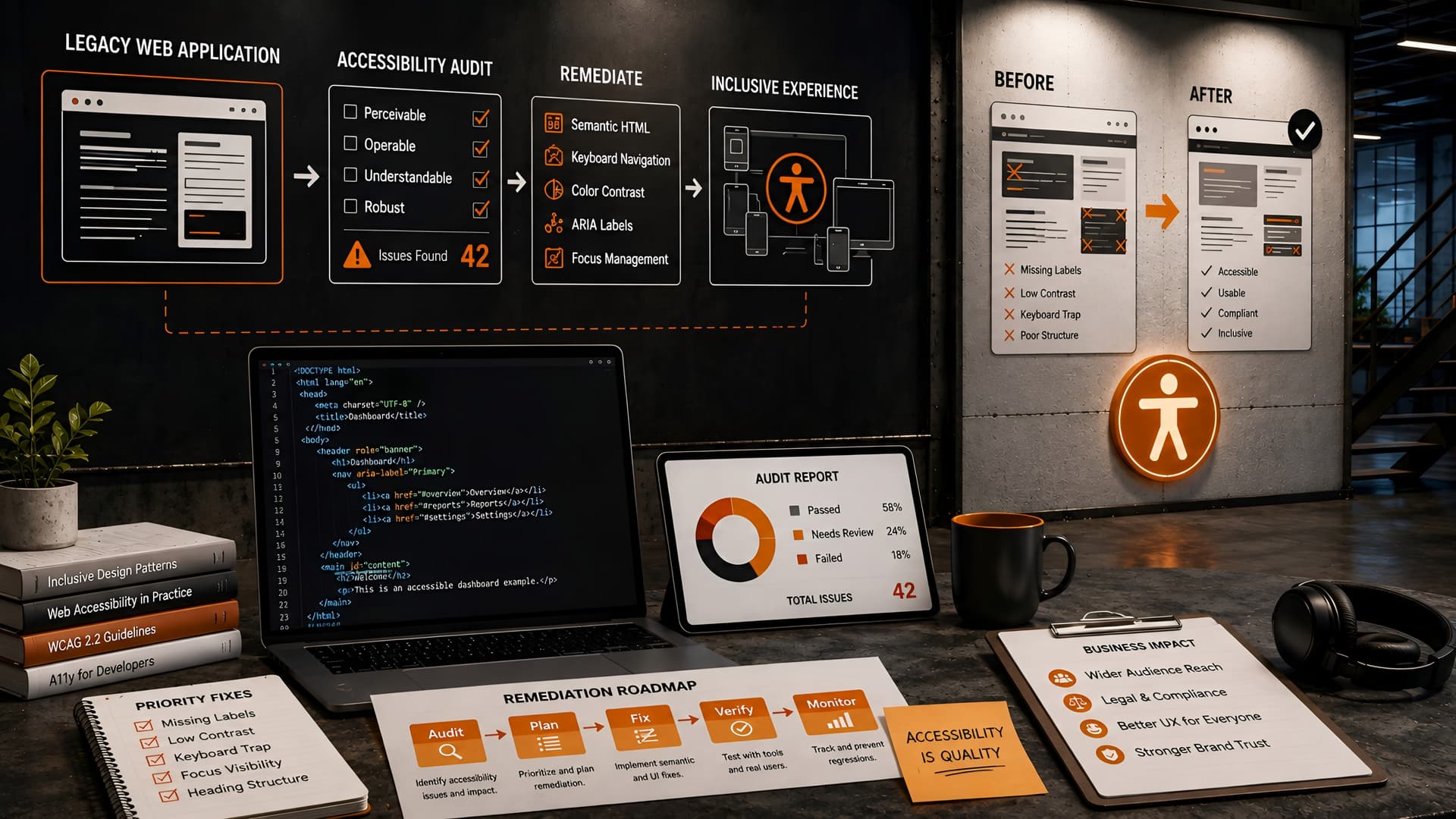
Many organizations rely on powerful, established web applications built years ago. These systems, while functional, often carry a significant burden: 'accessibility debt.'
This debt accrues when accessibility considerations were not part of the initial design or development process, leading to a user experience that excludes individuals with disabilities and introduces potential legal and reputational risks.
Understanding Accessibility Debt in Legacy Systems
Accessibility debt is similar to technical debt, but specifically concerns barriers that prevent users with disabilities from effectively interacting with a digital product. In legacy web applications, this debt is particularly insidious because it's often deeply embedded in the codebase and UI patterns.
Common issues range from missing semantic HTML and inadequate color contrast to keyboard navigation failures and inaccessible forms. Addressing these problems requires a systematic, thoughtful approach.
Why Prioritize Legacy Accessibility Remediation Now?
The push for digital accessibility is no longer optional; it's a fundamental expectation. Legal frameworks like the Americans with Disabilities Act (ADA) in the US, the European Accessibility Act, and WCAG (Web Content Accessibility Guidelines) provide clear standards and increasing enforcement.
Beyond compliance, an accessible application simply serves more people. It expands your market reach, improves brand perception, and often enhances the user experience for everyone, not just those with disabilities. Neglecting it can lead to costly lawsuits, negative public perception, and a failure to meet ethical obligations.
Phase 1: Comprehensive Accessibility Auditing and Discovery
Before any remediation work begins, a thorough audit is essential. This phase aims to identify every accessibility barrier within the legacy application, providing a clear picture of the scope and scale of the debt.
We approach this with a multi-pronged strategy, combining automated tools with expert manual testing to catch issues that machines often miss.
Automated Testing Tools
Automated tools are excellent for quickly identifying common, easily detectable issues like missing alt text, insufficient color contrast, or incorrect ARIA attributes. Tools like Lighthouse, axe-core, and WAVE can be integrated into CI/CD pipelines for ongoing checks or run on demand.
While efficient, these tools typically only catch about 30-50% of WCAG violations. They are a starting point, not a complete solution.
Manual and Expert Review
This is where human expertise becomes critical. Manual testing involves experienced accessibility professionals navigating the application using assistive technologies, such as screen readers (JAWS, NVDA, VoiceOver), keyboard-only navigation, and magnification tools.
Reviewers also check for logical reading order, clear error messages, consistent navigation, and complex interaction patterns that automated tools cannot evaluate effectively. This includes reviewing custom components and dynamic content.
User Testing with Individuals with Disabilities
The gold standard for validating accessibility is direct user testing. Engaging individuals with various disabilities provides invaluable insights into real-world usability challenges and uncovers issues that even expert testers might overlook.
This feedback loop is crucial for ensuring that remediation efforts genuinely improve the user experience and address actual pain points. It also fosters empathy within the development team.
Phase 2: Prioritization and Remediation Strategy
Once the audit is complete, you'll likely have a long list of issues. The next step is to prioritize them strategically, especially in a legacy context where resources might be constrained and disruption needs to be minimized.
Our goal is to tackle the most impactful issues first, balancing legal risk, user impact, and engineering effort.
Establishing a Prioritization Framework
We typically categorize issues based on severity (blocking, critical, moderate, minor) and WCAG conformance level (A, AA, AAA). A common approach is to prioritize issues that:
- Directly prevent users from completing critical tasks (e.g., inaccessible forms, navigation).
- Pose significant legal risk (e.g., major WCAG A or AA violations).
- Impact a large number of users.
- Are relatively easy to fix with low development effort.
Phased Implementation Approaches
Remediating a large legacy application all at once is often impractical. A phased approach allows for continuous delivery of improvements without significant downtime or a complete rewrite.
We often recommend tackling accessibility in logical modules or user flows. For example, focusing first on critical user journeys like login, registration, and core functionality before moving to less frequently used sections.
Lift-and-Shift Incremental Remediation
This approach involves making accessibility improvements directly within the existing codebase. It's often suitable for applications with a stable but dated architecture.
The benefits include lower initial overhead and a more direct path to compliance for specific components. However, it can be challenging if the underlying architecture is fundamentally incompatible with modern accessibility practices.
Component-Based Refactoring
For more complex legacy systems, especially those with custom UI frameworks, refactoring core components into accessible, reusable modules can be highly effective. This might involve creating a new design system or component library that is accessible by design.
While more upfront work, this approach builds a strong foundation for future development, reduces future accessibility debt, and enhances maintainability. It also aligns well with modern frontend development practices.
Progressive Enhancement or Feature Rework
Sometimes, entire sections or features of a legacy application are so deeply inaccessible that incremental fixes are insufficient. In such cases, a strategy of progressively enhancing or completely re-working those specific features might be necessary.
This allows for the introduction of modern, accessible technologies for new or updated functionalities, gradually replacing the legacy components over time. This can be combined with our website redesign approach for a holistic update.
Phase 3: Technical Remediation Strategies and Best Practices
Effective remediation requires a deep understanding of web technologies and accessibility principles. Here are some key areas we focus on:
Semantic HTML and ARIA Roles
The foundation of accessibility lies in correct semantic HTML. Using appropriate HTML5 elements (<nav>, <main>, <aside>, <footer>, <button>, <form>) provides inherent meaning for assistive technologies.
When custom components or complex widgets are necessary, ARIA (Accessible Rich Internet Applications) attributes become crucial. ARIA roles, states, and properties communicate dynamic content and interactive elements to screen readers, ensuring complex UIs remain navigable and understandable.
Keyboard Navigation and Focus Management
Many users, including those with motor impairments or who use screen readers, rely solely on keyboard navigation. Ensuring that all interactive elements are reachable and operable via keyboard (Tab, Shift+Tab, Enter, Spacebar, arrow keys) is non-negotiable.
Proper focus management ensures a logical tab order and visible focus indicators. For dynamic content, managing focus shifts to guide users to new or updated information is vital to prevent disorientation.
Color Contrast and Visual Design
Insufficient color contrast makes text and interactive elements unreadable for users with low vision or color blindness. WCAG 2.1 AA requires a contrast ratio of at least 4.5:1 for normal text and 3:1 for large text and graphical objects.
Beyond contrast, ensure that color is not the *only* means of conveying information. Use icons, text labels, or patterns in addition to color to communicate status or meaning.
Forms and Error Handling
Inaccessible forms are a major pain point. Every form field needs a clear, programmatically associated label (<label for="id">). Instructions, required fields, and error messages must be clearly communicated and associated with their respective fields.
Error messages should be descriptive, suggest solutions, and be programmatically linked to the invalid fields, ensuring screen reader users understand how to correct their input.
Integrating Accessibility into the Development Workflow
Remediation isn't a one-time project; it's an ongoing commitment. To prevent future accessibility debt, it must be woven into the standard development lifecycle.
At Muhyo Tech, we advocate for 'shift-left' accessibility, meaning considerations are made from the earliest design phases through development and QA.
Training and Awareness
Educate your entire team – designers, developers, QA, and product owners – on accessibility principles and best practices. Regular training helps foster an inclusive mindset and ensures everyone understands their role in building accessible products.
Providing clear guidelines and resources empowers teams to catch issues early.
Automated Checks in CI/CD
Integrate automated accessibility checks (e.g., axe-core CLI, Lighthouse audits) into your continuous integration and deployment pipelines. This provides an immediate feedback loop, flagging obvious violations before they even reach staging environments.
While not exhaustive, these checks prevent regressions and reinforce good practices.
Dedicated QA and User Acceptance Testing
Accessibility testing should be a standard part of your QA process. Include accessibility test cases in your test plans and ensure QA engineers are trained to perform manual checks, including keyboard navigation and screen reader testing.
For critical features, allocate resources for user acceptance testing with individuals with disabilities.
The Business Value of Accessible Legacy Systems
Investing in legacy web accessibility remediation delivers tangible business benefits that extend far beyond compliance.
| Benefit Category | Impact on Business |
|---|---|
| Reduced Legal Risk | Minimizes exposure to lawsuits and regulatory fines, protecting brand reputation and financial stability. |
| Expanded Market Reach | Opens your application to a wider audience, including people with disabilities, increasing potential users or customers. |
| Improved User Experience | Better usability for everyone, often leading to higher satisfaction, reduced support costs, and increased engagement. |
| Enhanced Brand Reputation | Demonstrates a commitment to corporate social responsibility and inclusivity, strengthening public perception. |
| SEO Benefits | Many accessibility best practices (semantic HTML, clear content structure, alt text) also improve search engine optimization. |
| Innovation & Modernization | Often necessitates refactoring, leading to a more modern, maintainable codebase that is easier to update and scale. |
By making your legacy applications accessible, you are not just ticking a box; you are future-proofing your digital assets and fostering a more inclusive digital environment.
Common Pitfalls and How to Avoid Them
Remediating legacy systems presents unique challenges. Being aware of common pitfalls can help teams navigate the process more smoothly.
Ignoring the Full Scope
One major mistake is underestimating the depth of accessibility debt. A superficial audit might miss critical issues, leading to incomplete remediation and ongoing compliance risks.
Avoidance: Conduct a truly comprehensive audit using both automated and manual methods, involving expert testers and, if possible, real users.
Lack of Prioritization
Trying to fix everything at once can overwhelm teams and delay critical improvements. Without clear prioritization, efforts can be misdirected.
Avoidance: Implement a robust prioritization framework that considers severity, user impact, legal risk, and development effort.
Treating Accessibility as a One-Time Project
Accessibility is an ongoing commitment, not a checkbox. If not integrated into the development lifecycle, new features will inevitably introduce new accessibility debt.
Avoidance: Embed accessibility into design, development, and QA processes. Provide ongoing training and integrate automated checks.
Over-Reliance on Automated Tools
While useful, automated tools have significant limitations. They cannot evaluate context, logical flow, or complex interactions.
Avoidance: Always supplement automated testing with expert manual review and, ideally, user testing with individuals with disabilities.
Lack of Stakeholder Buy-in
Without support from product owners, engineering managers, and legal teams, accessibility initiatives can struggle for resources and prioritization.
Avoidance: Clearly articulate the business case for accessibility, highlighting legal risks, market opportunities, and ethical responsibilities.
Frequently Asked Questions (FAQs)
How long does a typical legacy accessibility audit take?
The duration varies significantly based on the application's size and complexity. A small application might take a few weeks, while a large enterprise system could require several months for a thorough audit. The key is to be comprehensive rather than rushed.
What are the primary costs associated with legacy accessibility remediation?
Costs include expert audit fees, development time for remediation (which can involve refactoring or even redesign), potential licensing for accessibility tools, and user testing. Proactive remediation is almost always less costly than reactive legal challenges.
Can we achieve WCAG 2.1 AA compliance in an old, complex application?
Yes, achieving WCAG 2.1 AA compliance is generally possible, even for complex legacy applications. It often requires significant effort, careful planning, and a phased approach. Sometimes, minor compromises might be necessary for extremely complex or rarely used features, but the goal should always be to meet the highest possible standard.
How do we ensure new features remain accessible after remediation?
The best way is to integrate accessibility into every stage of your development lifecycle. This includes accessible design specifications, developer training, automated accessibility checks in CI/CD, and dedicated accessibility testing during QA. Making accessibility a 'definition of done' for every new feature is crucial.
Conclusion: Making Inclusivity a Cornerstone, Even for Legacy Systems
Remediating accessibility debt in legacy web applications is a significant undertaking, but it's an investment that pays dividends. It transforms your digital assets from potential liabilities into inclusive, robust platforms that serve a broader audience and uphold ethical standards.
At Muhyo Tech, we understand the complexities of modernizing and optimizing existing systems. Our approach to legacy accessibility remediation focuses on practical, phased strategies that minimize disruption while delivering meaningful improvements. We believe that every user deserves an equitable digital experience, and that good engineering can make it happen.
By systematically auditing, prioritizing, and implementing solutions, organizations can navigate the challenges of legacy systems, reduce legal exposure, and unlock new opportunities for growth and user satisfaction.