


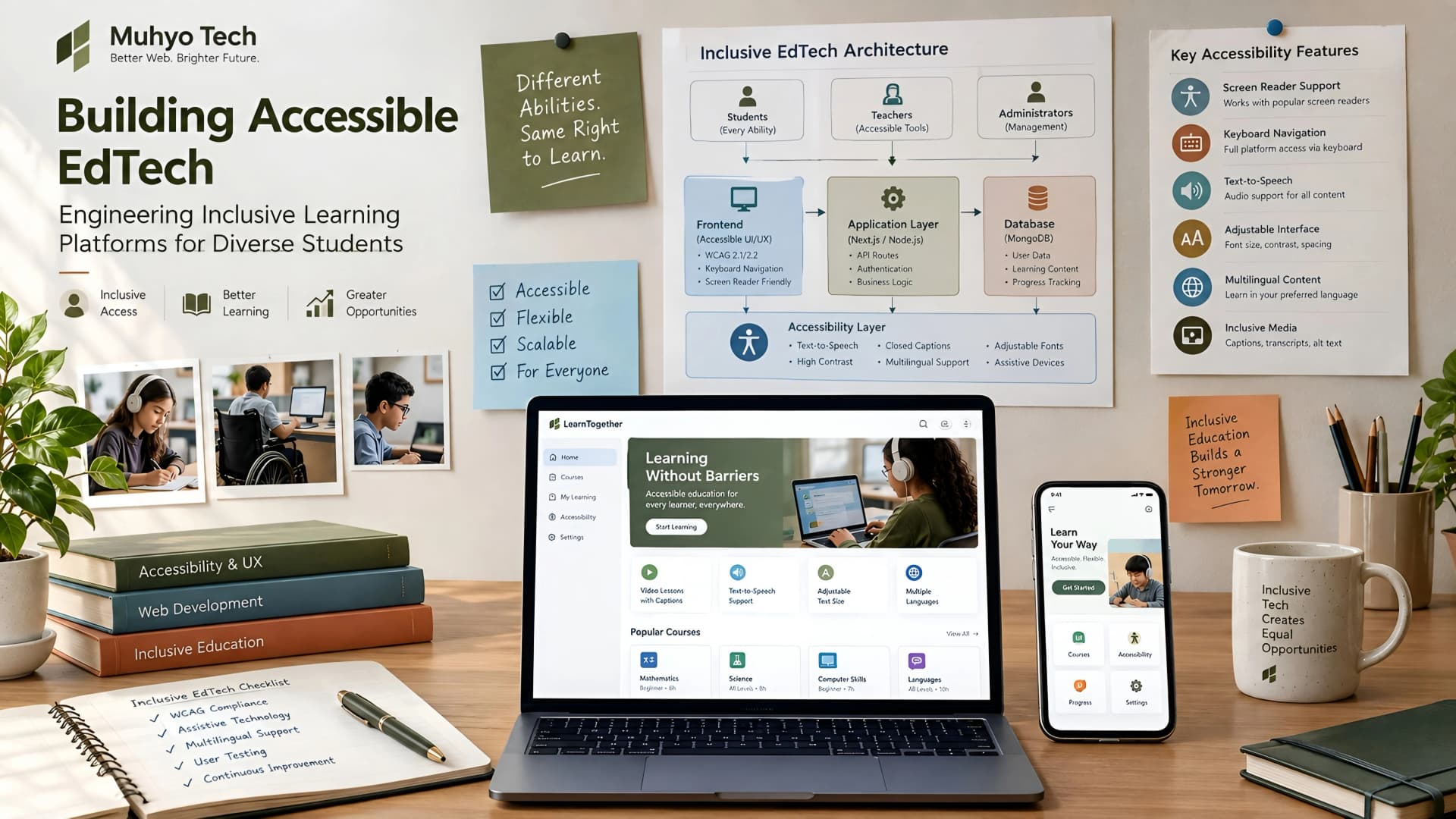
EdTech platforms promise to democratize education, yet many inadvertently create new barriers. Students with disabilities often struggle with interfaces not designed for screen readers, keyboard navigation, or visual impairments. This oversight limits their access to crucial learning resources and can expose platforms to legal and reputational risks.
Building truly accessible EdTech means integrating inclusivity from the very first line of code. It's not an afterthought or a checkbox exercise; it's a foundational engineering principle. Our goal at Muhyo Tech is to approach this challenge systematically, ensuring every student can engage with educational content effectively.
The Core Problem: Exclusion by Design
Many EdTech platforms are built with a primary focus on feature velocity and visual aesthetics. Accessibility considerations, if addressed at all, are often bolted on late in the development cycle. This leads to brittle solutions and a poor user experience for a significant portion of the student population.
The consequences extend beyond individual users. Limited accessibility can restrict market reach, particularly in regions or institutions with strict compliance requirements. It also introduces legal vulnerabilities, as accessibility laws become more stringent globally.
Understanding WCAG: The Baseline for EdTech Accessibility
The Web Content Accessibility Guidelines (WCAG) are the international standard for web accessibility. For EdTech, understanding WCAG 2.1 or 2.2 at levels AA or AAA is critical. These guidelines are structured around four core principles: Perceivable, Operable, Understandable, and Robust (POUR).
Ignoring WCAG is like building a school without ramps or braille signs; it fundamentally excludes users. Adherence ensures your platform can be used by a wider audience, including those relying on assistive technologies.
Key WCAG Guidelines for EdTech Platforms
- Perceivable: All content must be presentable to users in ways they can perceive. This includes providing text alternatives for non-text content (images, videos), captions for audio, and ensuring sufficient contrast ratios.
- Operable: User interface components and navigation must be operable. This means full keyboard accessibility, adequate time limits for tasks, and avoiding content that causes seizures.
- Understandable: Information and the operation of the user interface must be understandable. This involves making text readable and predictable, and providing input assistance.
- Robust: Content must be robust enough that it can be interpreted reliably by a wide variety of user agents, including assistive technologies. This emphasizes valid, semantic HTML and ARIA attributes.
Engineering for Inclusivity: A Technical Framework
Our approach to accessible EdTech development focuses on a few key pillars. We integrate these practices into our custom website development workflows from the discovery phase onward. This ensures accessibility is a feature, not a bug.
1. Semantic HTML and ARIA Roles
The foundation of an accessible EdTech platform lies in its underlying markup. Using semantic HTML5 elements (<nav>, <article>, <aside>, <main>, <footer>) provides inherent structure for assistive technologies. Screen readers rely on this structure to convey meaning.
When semantic HTML isn't sufficient, Accessible Rich Internet Applications (ARIA) attributes bridge the gap. ARIA roles, states, and properties communicate dynamic content and complex UI components (like custom dropdowns or tabs) to assistive technologies. For example, aria-label, aria-describedby, and aria-live are indispensable.
2. Keyboard Navigation and Focus Management
Many users, including those with motor impairments or visual disabilities, navigate entirely via keyboard. Every interactive element—buttons, links, form fields, navigation menus—must be reachable and operable using only the keyboard (Tab, Shift+Tab, Enter, Spacebar, arrow keys).
Visible focus indicators are equally critical. Users need to clearly see which element is currently active. Custom focus styles must meet contrast requirements and be distinct from hover states. Managing focus programmatically after dynamic content updates or modal openings is also crucial for a smooth experience.
3. Comprehensive Media Accessibility
EdTech relies heavily on multimedia. All video content must include accurate closed captions and transcripts. For pre-recorded video, audio descriptions are often necessary to convey visual information to users who are blind or have low vision.
Images require descriptive alt text. Complex images, like charts or diagrams, might need longer descriptions or even a separate accessible data table. Audio-only content requires transcripts.
4. Color Contrast and Readability
Text and interactive elements must have sufficient contrast against their background. WCAG specifies minimum contrast ratios (e.g., 4.5:1 for normal text). This isn't just for users with visual impairments; it benefits everyone in varying lighting conditions or with tired eyes.
Font choices, line height, and paragraph spacing also impact readability. Providing options for users to adjust text size without breaking the layout is a strong accessibility feature, particularly important for a website redesign project.
Integrating Accessibility into the Development Workflow
Building accessible EdTech isn't a one-time task; it's an ongoing process. We embed accessibility checks at every stage of our development lifecycle, from design mockups to deployment.
Design Phase: Accessibility by Default
During UI/UX design, we consider accessibility from the outset. This means designing color palettes that meet contrast standards, planning for keyboard navigation paths, and visualizing focus states. Thinking about screen reader user flows during wireframing prevents costly rework later.
Development Phase: Proactive Coding Practices
Developers are trained on semantic HTML, ARIA best practices, and JavaScript techniques for managing focus and dynamic content. Code reviews include accessibility checks. Linting tools and automated accessibility checkers are integrated into the build process, flagging common issues early.
Testing Phase: Manual and Automated Audits
Automated tools (Lighthouse, axe-core) provide a baseline, but they only catch about 30-50% of accessibility issues. Manual testing with assistive technologies (screen readers like NVDA/JAWS/VoiceOver, screen magnifiers) by trained testers is indispensable. We also advocate for user testing with individuals with disabilities when feasible.
Deployment and Monitoring: Continuous Improvement
Post-deployment, ongoing monitoring and user feedback loops are vital. Accessibility audits should be part of regular maintenance cycles. As new features are added, they must go through the same rigorous accessibility process. This continuous loop ensures the platform remains compliant and inclusive.
Common Accessibility Pitfalls in EdTech and How to Avoid Them
| Pitfall | Description | Avoidance Strategy |
|---|---|---|
| Lack of Keyboard Support | Interactive elements unreachable or unusable with keyboard alone. | Test all interactions with Tab, Shift+Tab, Enter, Spacebar. Ensure visible focus styles. |
| Poor Color Contrast | Text or UI elements blend into backgrounds, difficult to read. | Use WCAG contrast checkers during design. Implement a compliant color palette. |
| Missing Alt Text | Images without descriptive alternative text for screen readers. | Mandate alt text for all non-decorative images. Provide contextual descriptions. |
| Unlabeled Form Fields | Input fields without associated <label> elements or aria-label. | Always associate labels with form fields. Provide clear instructions. |
| Non-Semantic HTML | Using <div> for everything, lacking structural meaning. | Prioritize HTML5 semantic elements (<nav>, <button>, <h1>). |
| Dynamic Content Issues | Modals, alerts, or AJAX updates not announced to screen readers. | Use ARIA live regions (aria-live="polite") for dynamic updates. Manage focus shifts. |
Prioritizing Assistive Technologies
While supporting every assistive technology (AT) perfectly is challenging, certain categories are critical for EdTech. Our focus often includes:
- Screen Readers: JAWS, NVDA (Windows), VoiceOver (macOS/iOS), TalkBack (Android). These are paramount for blind and low-vision users.
- Screen Magnifiers: ZoomText, built-in OS magnifiers. Essential for low-vision users.
- Speech Recognition Software: Dragon NaturallySpeaking, built-in OS voice control. Supports users with motor impairments.
- Keyboard Navigation: All browsers support this. Critical for motor impairments and some visual impairments.
Thorough testing across these categories ensures a broad reach. It helps us validate that our landing page designs and complex application interfaces are truly usable.
The Business Value of Accessible EdTech
Investing in accessibility is not just an ethical choice; it's a strategic business decision. For EdTech founders and CTOs, it offers tangible benefits.
- Expanded Market Reach: An accessible platform can serve a larger student population, including individuals with disabilities and those in diverse learning environments. This opens new opportunities for growth and adoption.
- Enhanced Brand Reputation: Demonstrating a commitment to inclusivity builds trust and positive brand perception. It positions your platform as forward-thinking and socially responsible.
- Legal Compliance and Risk Mitigation: Adhering to WCAG and local accessibility laws (e.g., ADA in the US, EN 301 549 in Europe) reduces the risk of costly lawsuits and regulatory penalties.
- Improved SEO: Many accessibility best practices (semantic HTML, clear headings, descriptive alt text) align directly with SEO best practices. This can lead to better search engine rankings and discoverability.
- Better User Experience for All: Features designed for accessibility, like clear contrast or keyboard navigation, often improve usability for all users, regardless of ability.
Making the Decision: Where to Start?
For existing EdTech platforms, the journey to full accessibility can seem daunting. A comprehensive accessibility audit is usually the first step, identifying critical issues and forming a roadmap. For new platforms, integrating accessibility into the core architecture from day one is far more efficient.
At Muhyo Tech, we emphasize a phased approach. We prioritize critical issues based on WCAG success criteria and user impact, then iteratively improve. This ensures a sustainable path to an inclusive learning experience.
Frequently Asked Questions (FAQs)
What are the key WCAG guidelines relevant to EdTech platform development?
For EdTech, focus on WCAG 2.1 or 2.2 at AA conformance level. Key guidelines include providing text alternatives, keyboard accessibility, clear headings and structure, sufficient color contrast, and captions/transcripts for media. These ensure content is perceivable, operable, understandable, and robust for diverse users.
How can developers integrate accessibility testing into their EdTech development workflow?
Integrate automated tools like Lighthouse or axe-core into CI/CD pipelines for early detection. Conduct regular manual accessibility audits using screen readers and keyboard navigation. Prioritize user testing with individuals with disabilities to gather real-world feedback. Make accessibility a mandatory part of code reviews and QA processes.
What are common accessibility pitfalls in EdTech platforms and how can they be avoided?
Common pitfalls include lack of keyboard navigation, poor color contrast, missing alt text for images, unlabeled form fields, and non-semantic HTML. Avoid these by designing with accessibility in mind, using semantic HTML and ARIA attributes correctly, implementing a compliant color palette, and thoroughly testing all interactive elements with keyboard and screen readers.
Final Thoughts on Building Inclusive Learning
Accessible EdTech is not just about meeting compliance; it's about delivering on the promise of education for everyone. It's about engineering platforms that are robust, reliable, and genuinely inclusive. As founders and engineers, we have the opportunity—and the responsibility—to build systems that empower all learners.
This commitment to inclusive design is a core principle at Muhyo Tech. We believe that well-engineered systems are those that serve the widest possible audience, ensuring that no student is left behind due to technical barriers.