


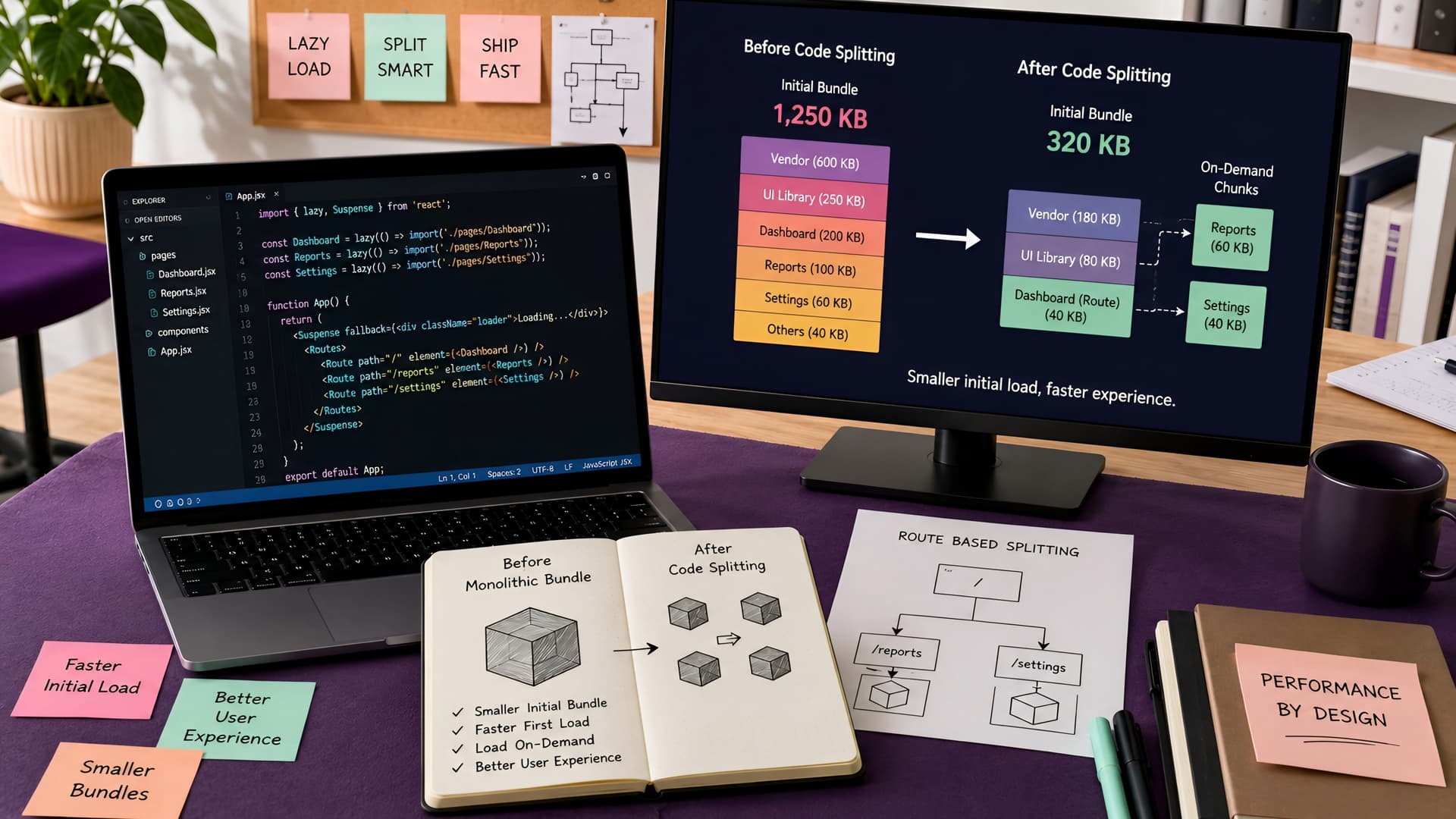
A large JavaScript bundle can feel like a lead weight dragging down your web application. Users wait longer for content to appear, often abandoning the page before it even fully loads. This isn't just an annoyance; it's a significant barrier to user engagement and a hit to your search engine rankings.
At Muhyo Tech, we often see this issue as a primary bottleneck for scaling React applications. Optimizing initial load times is critical for delivering a snappy, professional user experience from the first click.
The Problem with Monolithic Bundles
When you build a React application, tools like Webpack or Rollup typically combine all your JavaScript code, dependencies, and styles into one or a few large bundles. This single, massive file then needs to be downloaded, parsed, and executed by the browser before your application can become interactive.
For complex enterprise applications with many features and third-party libraries, this bundle can easily grow to several megabytes. The larger the bundle, the longer the initial download and processing time, especially on slower network connections or less powerful devices.
What is Code Splitting?
Code splitting is a technique that breaks down your large JavaScript bundle into smaller, more manageable chunks. Instead of loading everything upfront, the browser only downloads the code necessary for the user's current view or interaction.
This approach significantly reduces the initial payload, allowing your application to become interactive much faster. The remaining chunks are then loaded on demand, as the user navigates or triggers specific features.
Dynamic Imports with React.lazy() and Suspense
React provides built-in mechanisms to facilitate code splitting, most notably React.lazy() in conjunction with Suspense. This combination allows you to render a dynamically imported component as if it were a regular component, while React handles the loading state.
React.lazy() takes a function that returns a promise, which resolves to a module with a default export. This is perfect for importing components only when they are needed. The Suspense component then lets you display a fallback UI, such as a loading spinner, while the lazy component is being loaded.
const LazyComponent = React.lazy(() => import('./MyHeavyComponent'));
function App() {
return (
<div>
<Suspense fallback={<div>Loading...</div>}>
<LazyComponent />
</Suspense>
</div>
);
}
This pattern is particularly effective for routes, modals, or components that are only displayed conditionally. It ensures users only download the code for features they actually interact with, leading to a much snappier initial experience.
Route-Based Code Splitting
One of the most common and impactful applications of code splitting is at the route level. When a user navigates to a specific page, they only need the JavaScript required for that page, not the entire application.
With libraries like React Router, you can easily implement route-based code splitting by making each route's component a lazy-loaded module. This ensures that when a user lands on your homepage, they don't download the code for your entire admin panel or complex analytics dashboards.
import React, { Suspense, lazy } from 'react';
import { BrowserRouter as Router, Routes, Route } from 'react-router-dom';
const Home = lazy(() => import('./pages/Home'));
const About = lazy(() => import('./pages/About'));
const Dashboard = lazy(() => import('./pages/Dashboard'));
function AppRoutes() {
return (
<Router>
<Suspense fallback={<div>Loading page...</div>}>
<Routes>
<Route path='/' element={<Home />} />
<Route path='/about' element={<About />} />
<Route path='/dashboard' element={<Dashboard />} />
</Routes>
</Suspense>
</Router>
);
}
This strategy is a cornerstone of our approach to building high-performance React applications, as discussed in our deep dive into Engineering High-Performance React Applications. It directly translates to quicker first contentful paint and interactive times.
Considerations and Tradeoffs
While code splitting offers significant performance benefits, it's not a silver bullet without tradeoffs. Managing many small chunks can sometimes add complexity to your build process and deployment.
There's also the potential for a 'waterfall effect' if too many small chunks are loaded sequentially, which can ironically slow things down. The key is to find the right balance, splitting at logical boundaries like routes, major features, or large third-party libraries.
The Business Value of Faster Loads
Faster initial loads are not just a technical win; they translate directly into tangible business value. A smoother, quicker experience means happier users, higher conversion rates, and better search engine visibility.
Improved Core Web Vitals scores, particularly for Largest Contentful Paint (LCP) and First Input Delay (FID), are a direct result of effective code splitting. These scores are crucial for SEO and user retention, ensuring your application performs well in competitive digital environments.
Our work at Muhyo Tech consistently focuses on these optimizations, whether we are involved in website speed optimization for an existing platform or building a new full-stack web application or Next.js website. Proactive code splitting is a standard we uphold to ensure long-term scalability and maintainability.
Conclusion
Code splitting is an essential technique for any React developer aiming to build high-performance web applications. By strategically breaking down your JavaScript bundles, you can drastically improve initial load times, enhance user experience, and positively impact your SEO.
It requires careful consideration of your application's architecture and user flows, but the benefits in terms of speed and user satisfaction are well worth the effort. Embracing code splitting means delivering a faster, more responsive web experience that keeps users engaged and coming back.