


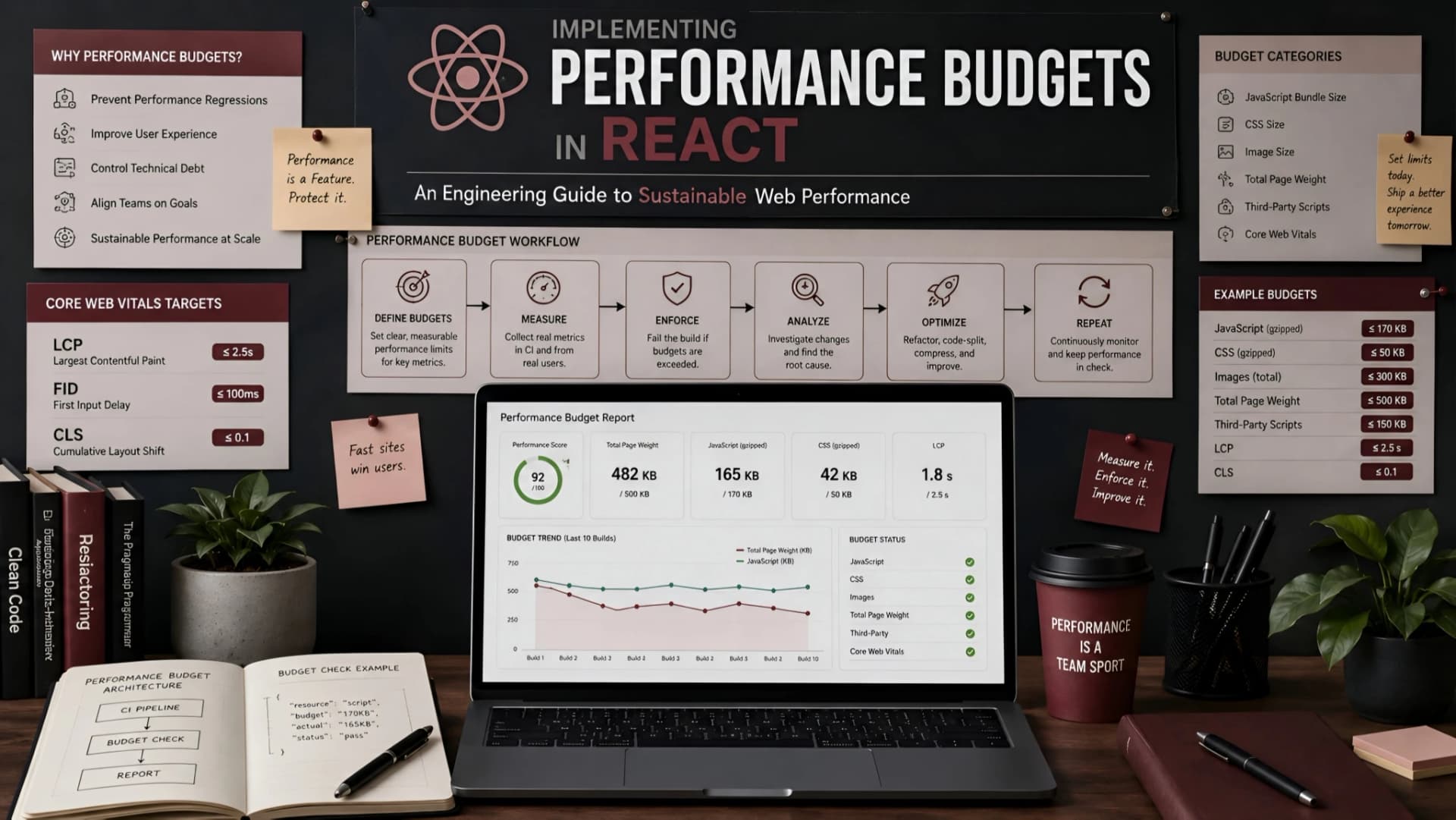
React applications, like any complex software, are susceptible to performance degradation over time. New features, third-party libraries, and incremental code additions can quietly bloat bundle sizes and slow down user interactions.
This creeping decline often goes unnoticed until a critical mass is reached, leading to frustrated users and a scramble to optimize.
The Pain of Unchecked Performance Growth
Imagine launching a React application that feels snappy and responsive. Everyone is happy.
Months later, after several feature sprints, users start complaining about slow loading times, janky animations, and general sluggishness. The codebase has grown, but performance metrics haven't been consistently monitored or enforced.
This scenario highlights a common pain point: the lack of a proactive strategy to maintain performance. Without clear boundaries, even well-intentioned development can chip away at the user experience.
What are Performance Budgets?
Performance budgets are quantitative limits set on various aspects of a web application's performance. Think of them like financial budgets, but for speed and efficiency.
They define acceptable thresholds for metrics such as bundle size, load times, script execution, and visual completeness. The goal is to ensure that new features or code changes do not push the application beyond these predefined limits.
At Muhyo Tech, we view performance budgets not as a one-time audit, but as an integral part of continuous integration and delivery. They act as a critical guardrail for sustainable application health.
Key Metrics for React Performance Budgets
Choosing the right metrics is crucial for an effective performance budget. We often categorize them into load performance, interactivity, and visual stability.
Focusing on a few impactful metrics provides clarity without overwhelming the team.
Load Performance Metrics
- Bundle Size (JavaScript, CSS, Images): This is often the most straightforward metric. Larger bundles mean more data to download and parse, directly impacting load times. We track total size and individual chunk sizes.
- First Contentful Paint (FCP): Measures when the first piece of content (text, image, non-white canvas) is rendered to the screen. It's a key perceived loading speed metric.
- Largest Contentful Paint (LCP): Reports the render time of the largest image or text block visible within the viewport. LCP is a Core Web Vital and crucial for user perception of loading speed.
- Time to Interactive (TTI): Measures how long it takes for a page to become fully interactive, meaning it responds reliably to user input. This accounts for main thread blocking.
Interactivity & Visual Stability Metrics
- Total Blocking Time (TBT): Sums up all periods where the main thread was blocked for long enough to prevent input responsiveness. This is another Core Web Vital.
- Cumulative Layout Shift (CLS): Quantifies unexpected layout shifts during the loading phase. A high CLS score indicates a poor user experience, as elements jump around.
- First Input Delay (FID): Measures the time from when a user first interacts with a page (e.g., clicks a button) to the time when the browser is actually able to respond to that interaction.
Defining Your React Performance Budget
Setting realistic budgets requires understanding your user base, target devices, network conditions, and business goals. There's no one-size-fits-all answer.
We typically start by auditing the current application's performance and then setting aspirational, yet achievable, targets.
Establish Baselines and Goals
First, measure your existing React application's performance using tools like Lighthouse or WebPageTest. This establishes a baseline.
Next, consider your target audience. Are they primarily on mobile devices with unreliable connections, or on desktops with fiber optic internet? This significantly influences your budget numbers.
Finally, align with business objectives. Is the primary goal conversion, engagement, or information delivery? Performance directly impacts all of these.
Example Budget Thresholds (Hypothetical)
| Metric | Budget Threshold | Impact |
|---|---|---|
| JavaScript Bundle Size | < 200KB (gzipped) | Faster download and parse times. |
| CSS Bundle Size | < 50KB (gzipped) | Quicker styling application. |
| Image Size (total) | < 500KB (initial load) | Reduced data transfer, faster FCP/LCP. |
| First Contentful Paint (FCP) | < 1.8 seconds | Improved perceived loading speed. |
| Largest Contentful Paint (LCP) | < 2.5 seconds | Better user experience for main content. |
| Time to Interactive (TTI) | < 3.0 seconds | Application becomes usable quicker. |
| Total Blocking Time (TBT) | < 200 ms | Ensures responsiveness to user input. |
| Cumulative Layout Shift (CLS) | < 0.1 | Prevents jarring visual instability. |
These are illustrative numbers; your specific application and audience will dictate the actual values. It's often better to start with slightly more forgiving budgets and tighten them over time as optimizations are made.
Tools and Implementation Strategies
Implementing performance budgets in a React project involves a combination of build-time checks, continuous monitoring, and developer workflow integration.
The goal is to catch regressions early, ideally before they reach production.
Build-Time Budget Enforcement
- Webpack Bundle Analyzer: Essential for visualizing your JavaScript bundle composition. It helps identify large dependencies or redundant code.
- Size-plugin (Webpack): Can be configured to fail a build if bundle sizes exceed predefined limits. This is a powerful first line of defense.
- Lighthouse CI: Integrate Lighthouse audits directly into your CI/CD pipeline. It can run performance tests on every pull request and fail the build if scores drop below a threshold or specific metrics exceed budgets.
- Bundlephobia / Webpack Bundle Analyzer CLI: Quick checks for dependency sizes during development.
Continuous Monitoring and Reporting
- Real User Monitoring (RUM) Tools: Solutions like Sentry, New Relic, or custom analytics can track Core Web Vitals and other performance metrics from actual users in production. This provides invaluable real-world data.
- Synthetic Monitoring: Tools like SpeedCurve, GTmetrix, or Lighthouse CI scheduled runs on production environments can provide consistent performance data over time, helping to detect regressions.
- Custom Dashboards: Display key performance metrics and budget status in a visible location for the team, fostering a culture of performance awareness.
Integrating Budgets into CI/CD
This is where performance budgets truly become effective. A failed performance budget should trigger a build failure, just like a failed unit test.
For React projects, this typically involves adding a step to your CI pipeline that runs Lighthouse CI or a custom script checking bundle sizes. If any budget is exceeded, the build is marked as failed, preventing the problematic code from being merged or deployed.
At Muhyo Tech, we embed performance checks directly into our CI/CD workflows. This ensures that every code change is validated against our performance standards, catching potential regressions before they impact users.
The Engineering Workflow with Performance Budgets
Effective performance budgeting isn't just about tools; it's about team culture and workflow. Engineers need to understand the 'why' behind the budgets and how to address violations.
Developer Responsibility and Education
Every developer on the team should be aware of the performance budgets and their impact. Training on common performance pitfalls in React (e.g., unnecessary re-renders, large component trees, unoptimized images) is beneficial.
When a budget fails, the developer responsible for the change should have the tools and knowledge to diagnose and fix the issue. This might involve code splitting, lazy loading components, optimizing images, or refactoring inefficient logic.
Proactive Optimization Strategies
- Code Splitting & Lazy Loading: Use
React.lazy()andSuspense, or dynamic imports with Webpack, to load components and modules only when they are needed. - Image Optimization: Serve appropriately sized and compressed images. Use modern formats like WebP. Implement lazy loading for images below the fold.
- Virtualization: For long lists, use libraries like
react-windoworreact-virtualizedto render only visible items, significantly improving performance. - Memoization: Use
React.memo(),useMemo(), anduseCallback()to prevent unnecessary re-renders of components and expensive computations. - Tree Shaking: Ensure your build tools effectively remove unused code from your bundles.
- Bundle Analysis: Regularly review your bundle composition using tools like Webpack Bundle Analyzer to identify and address bloat.
Tradeoffs and Common Pitfalls
While invaluable, performance budgets come with their own set of considerations. It's important to be aware of the tradeoffs and common mistakes.
Tradeoffs
- Development Speed vs. Performance: Strictly enforced budgets can sometimes slow down development if every new feature requires extensive performance optimization. A balance is key.
- Complexity: Setting up and maintaining a robust performance budgeting system adds initial complexity to the development workflow and CI/CD pipeline.
- False Positives/Negatives: Budget thresholds might sometimes be too strict or too lenient, leading to unnecessary reworks or missed regressions. Regular review is necessary.
Common Pitfalls
- Setting Unrealistic Budgets: Budgets that are too aggressive can lead to developer frustration and a perception that the system is unworkable.
- Ignoring Perceived Performance: Focusing solely on technical metrics without considering the user's subjective experience can be misleading. CLS and FID help bridge this gap.
- Lack of Team Buy-in: If the team doesn't understand or agree with the budgets, they can become a source of conflict rather than a helpful guide.
- One-Time Setup: Performance budgets are not 'set it and forget it'. They require continuous monitoring, review, and adjustment as the application evolves.
The Business Value of Sustainable Performance
For founders and business owners, the engineering effort behind performance budgets translates directly into tangible business value.
A fast, responsive React application is not just a technical achievement; it's a competitive advantage.
- Improved User Experience and Satisfaction: Faster load times and smoother interactions lead to happier users who are more likely to return and convert. This directly impacts retention and customer loyalty.
- Higher Conversion Rates: Studies consistently show that even small delays in page load time can significantly decrease conversion rates. A performant site keeps users engaged.
- Better SEO Rankings: Core Web Vitals are critical ranking factors for search engines. Meeting performance budgets helps ensure your application ranks higher, leading to increased organic traffic.
- Reduced Maintenance Risk: By preventing performance regressions, teams avoid costly, reactive optimization sprints down the line. Proactive budgeting is more efficient than crisis management.
- Enhanced Brand Reputation: A fast, reliable application reflects positively on your brand, building trust and professionalism.
- Predictable Project Costs: Integrating performance checks early helps prevent unforeseen performance bottlenecks that could lead to scope creep and budget overruns later in the project lifecycle.
Muhyo Tech's Approach to Performance Budgets
Our engineering team views performance budgets as a fundamental component of building resilient and scalable React applications. We don't just build features; we build experiences that perform reliably.
We typically start with a discovery phase to understand client performance expectations, existing baselines, and critical user journeys. From there, we define a custom set of performance budgets tailored to the project's unique requirements.
These budgets are then integrated into our development lifecycle, from local development checks to CI/CD pipelines and post-deployment monitoring. This holistic approach ensures that performance remains a first-class citizen throughout the application's lifespan, delivering long-term value and peace of mind.
Frequently Asked Questions (FAQs)
How often should performance budgets be reviewed or adjusted?
Performance budgets should be reviewed regularly, typically every quarter or whenever significant new features are introduced. As your application evolves and user expectations shift, your budgets may need to be tightened or loosened to remain realistic and impactful.
Can performance budgets be applied to specific routes or components in a React app?
Yes, absolutely. While global budgets are a good start, you can implement more granular budgets for critical routes or complex components. Tools like Lighthouse CI allow for specific audits on particular URLs, and custom scripts can analyze individual component bundle sizes.
What's the difference between Real User Monitoring (RUM) and Synthetic Monitoring for budgets?
RUM collects data from actual users interacting with your site in their real-world environments, providing a true picture of performance. Synthetic monitoring, conversely, uses automated scripts to test your site from controlled environments, offering consistent, repeatable measurements ideal for detecting regressions in CI/CD.
What if my React application consistently fails its performance budget?
If your application consistently fails its budget, it's a clear signal for a dedicated optimization effort. This might involve a deep dive into bundle analysis, identifying and refactoring inefficient components, optimizing data fetching, or re-evaluating the budget thresholds themselves to ensure they are realistic.
Conclusion
Implementing performance budgets in React applications is a proactive, strategic engineering decision that pays dividends over time. It shifts performance from a reactive firefighting exercise to an integral part of the development process.
By defining clear boundaries, leveraging powerful tooling, and fostering a performance-aware culture, teams can build React applications that not only deliver rich functionality but also provide a consistently fast and engaging user experience. This ultimately leads to stronger business outcomes, from higher conversions to enhanced brand loyalty.