


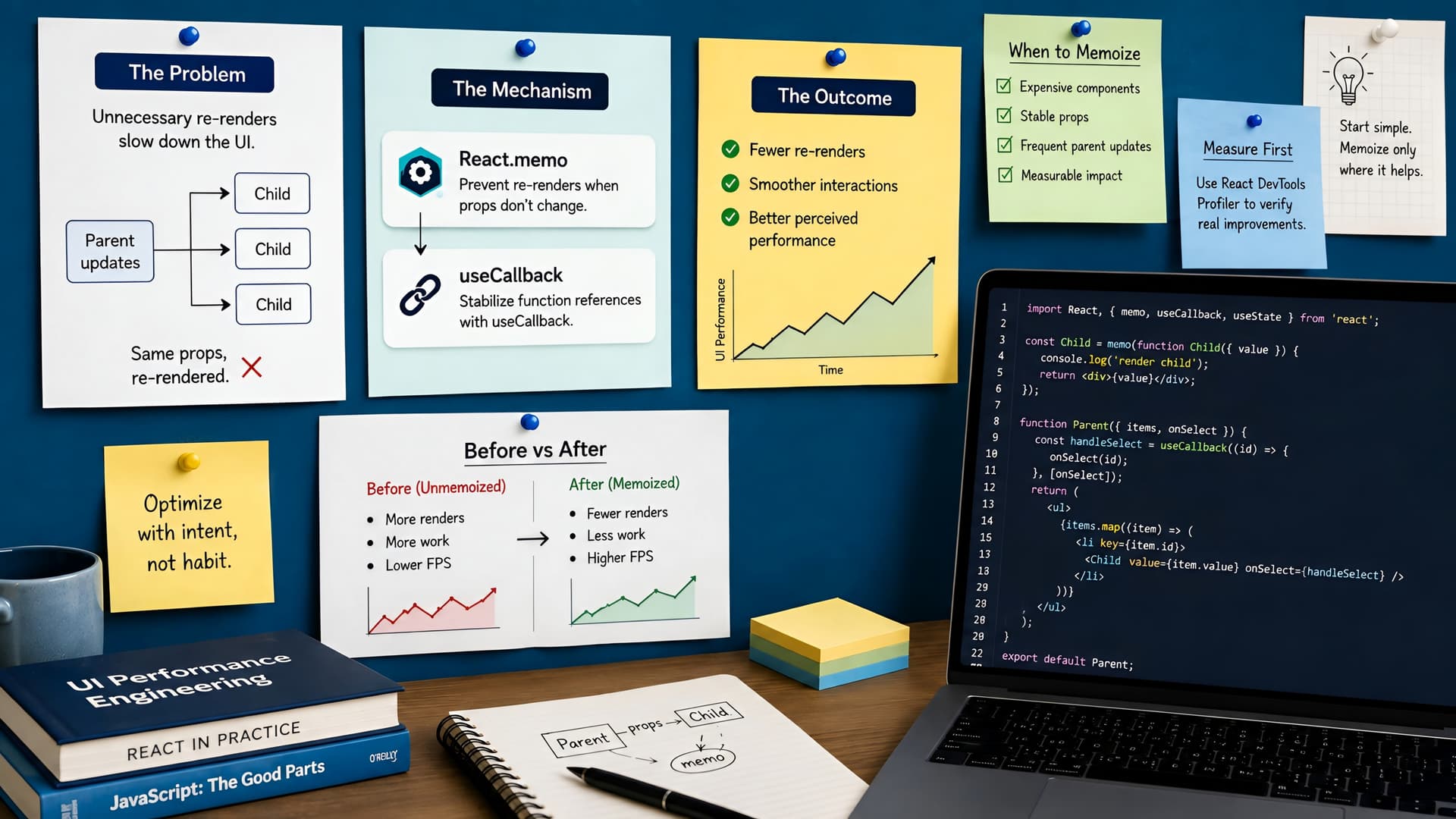
One of the most common frustrations in developing complex React applications is sluggish performance. Often, this isn't due to heavy computations but rather an abundance of unnecessary component re-renders. Each re-render, even for small components, consumes CPU cycles and can degrade the user experience.
We've seen this pattern countless times: a seemingly minor state update in a parent component triggers a cascade of re-renders down the component tree. This can lead to a UI that feels unresponsive, especially in data-rich enterprise applications. Understanding how to tackle this is fundamental for building robust, performant web apps, a core principle we embrace at Muhyo Tech.
The Re-Render Problem in React
By default, when a parent component re-renders, all its child components also re-render, regardless of whether their props have actually changed. This behavior is usually fine for smaller applications or simple components.
However, in larger applications with deep component trees or frequently updated data, this default can quickly become a performance bottleneck. Imagine a complex dashboard where a single filter change causes dozens of data tables and charts to re-render, even if only one small part of the data was affected.
Introducing React.memo: Preventing Re-Renders for Functional Components
React.memo is a higher-order component (HOC) that optimizes functional components by preventing re-renders when their props haven't changed. It essentially memoizes the component's output.
When a component wrapped with React.memo receives new props, React performs a shallow comparison between the new props and the previous props. If the props are identical, React reuses the last rendered result and skips the re-render. This can significantly cut down on wasted rendering cycles.
Practical Example: Using React.memo
Consider a UserCard component that displays user details. If this component is rendered inside a list where only one user's status might change, we don't want every other UserCard to re-render.
const UserCard = ({ user, onClick }) => {
  console.log(`Rendering UserCard for ${user.name}`);
  return (
    <div style={{ border: '1px solid #ccc', padding: '10px', margin: '10px' }}>
      <h3>{user.name}</h3>
      <p>Email: {user.email}</p>
      <button onClick={() => onClick(user.id)}>View Details</button>
    </div>
  );
};

export default React.memo(UserCard);
By wrapping UserCard with React.memo, it will only re-render if its user or onClick props change shallowly. This is a crucial step in optimizing list renderings, a common pattern in our full-stack web app development.
The Challenge of Callback Functions and Object Props
While React.memo is powerful, it has a common pitfall: functions and objects. In JavaScript, even if two functions look identical, they are different objects in memory unless explicitly memoized. The same applies to object literals passed as props.
Every time a parent component re-renders, any function or object defined directly within its render scope will be recreated. This new reference will then fail the shallow comparison performed by React.memo, causing the child component to re-render unnecessarily.
Enter useCallback: Memoizing Functions for Stable References
This is where useCallback comes into play. The useCallback hook returns a memoized version of the callback function that only changes if one of its dependencies has changed. It ensures that the same function instance is passed down to child components across re-renders.
Applying useCallback to our Example
Let's refine our parent component that renders a list of UserCards. If we pass an inline function for onClick, UserCard will still re-render even with React.memo.
import React, { useState, useCallback } from 'react';
import UserCard from './UserCard'; // The memoized UserCard

const UserList = ({ users }) => {
  const [activeUserId, setActiveUserId] = useState(null);

  // Without useCallback, this function is re-created on every UserList re-render
  // and causes UserCard to re-render too.
  const handleUserClick = useCallback((userId) => {
    setActiveUserId(userId);
    console.log(`Clicked user ID: ${userId}`);
  }, []); // Empty dependency array means this function is created once

  return (
    <div>
      <h2>User List</h2>
      {users.map((user) => (
        <UserCard key={user.id} user={user} onClick={handleUserClick} />
      ))}
      {activeUserId && <p>Active User ID: {activeUserId}</p>}
    </div>
  );
};

export default UserList;
By wrapping handleUserClick with useCallback and providing an empty dependency array [], we ensure that handleUserClick's reference remains stable. Now, our UserCard (wrapped with React.memo) will only re-render if the user prop itself changes, or if the handleUserClick function reference were to change (which it won't here).
When to Use Them (and When Not To)
The key to effective optimization is knowing when to apply these techniques. Over-optimizing can introduce unnecessary complexity and even degrade performance due to the overhead of memoization checks.
- Use
React.memofor: Components that render frequently, receive the same props often, and have significant rendering logic. Large lists or components with complex UI are prime candidates. - Use
useCallbackfor: Functions passed as props to memoized child components, or functions that are dependencies of other hooks (likeuseEffectoruseMemo) to prevent unnecessary re-runs. - Avoid premature optimization: Don't wrap every component or function. Profile your application first using React DevTools to identify actual performance bottlenecks. Only optimize components that are genuinely causing slow-downs.
- Consider the overhead: Memoization itself has a small cost (shallow comparison, memory storage). For simple components that render quickly, the overhead might outweigh the benefits.
Trade-offs and Best Practices at Muhyo Tech
At Muhyo Tech, our approach to performance optimization always involves a careful balance. While React.memo and useCallback are powerful tools, they should be applied judiciously. We often establish coding standards that encourage profiling before blanket application, focusing on high-impact areas.
We look for components that consume significant render time, particularly in data-heavy dashboards or interactive user interfaces. By selectively applying these memoization techniques, we deliver smoother user interfaces, reduce computational overhead, and achieve improved application responsiveness for our clients, enhancing overall user satisfaction and system reliability.
For a broader view on building high-performance React applications, you might find our main article on Engineering High-Performance React Applications: A Deep Dive into Optimization Techniques insightful.
Conclusion: A Sharper UI, Less Stress
Mastering React.memo and useCallback is a vital skill for any React developer working on scalable applications. They offer a direct path to addressing unnecessary re-renders, which often manifest as a sluggish user experience.
By understanding when and how to apply these hooks, you can build more efficient, responsive UIs. This attention to detail in performance optimization ultimately translates into happier users and more robust applications, a goal central to our work in full-stack web app development and website speed optimization.