


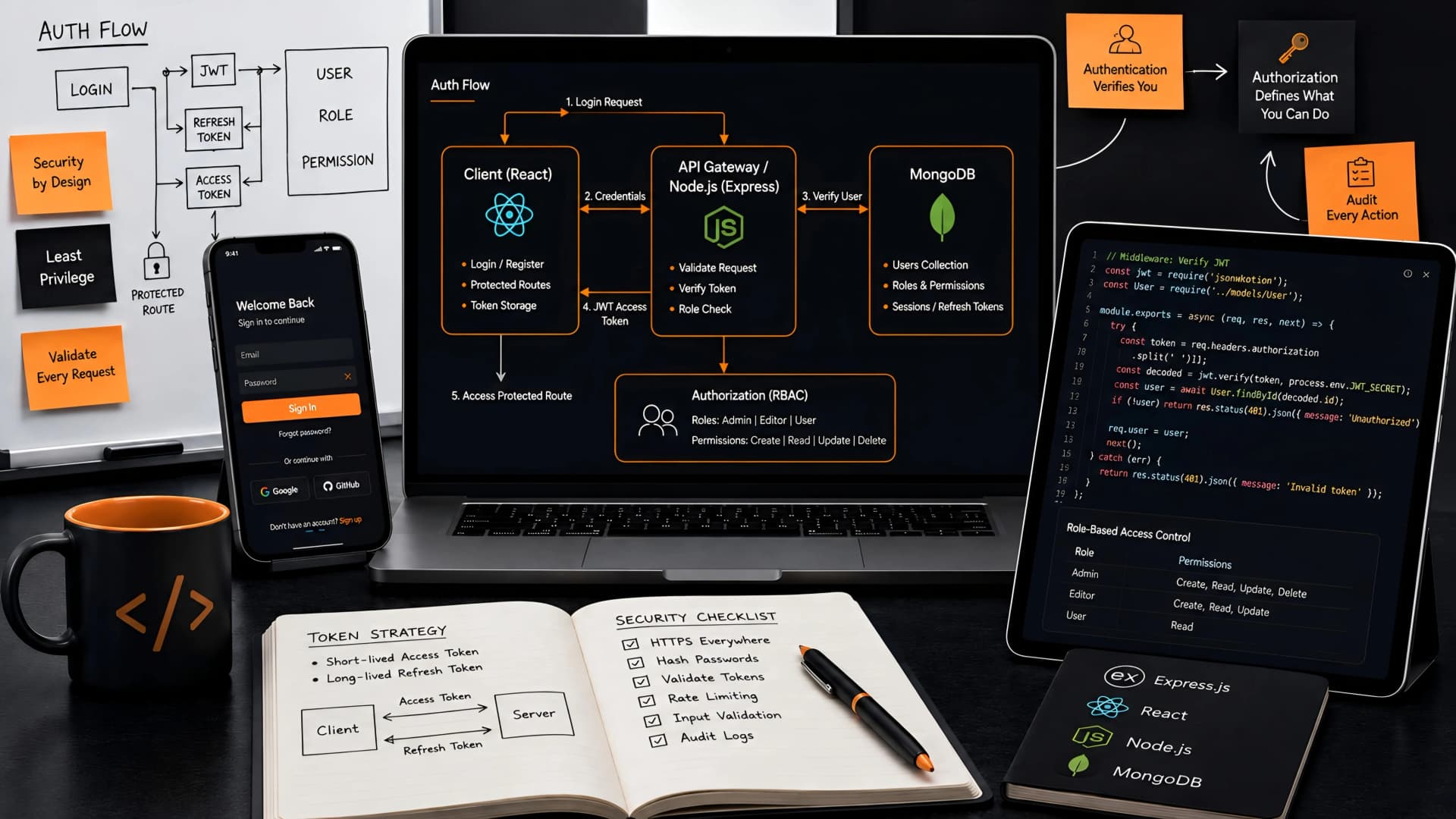
Building a web application without robust authentication and authorization is like constructing a house without locks on the doors. It might look functional, but it leaves your users and their data dangerously exposed. In the MERN stack, this crucial layer often becomes a complex puzzle, prone to subtle vulnerabilities if not approached with a solid engineering mindset.
We've seen firsthand how easily security gaps can emerge in MERN applications, from misconfigured JWTs to insufficient access controls. Our goal at Muhyo Tech is always to build systems that are not just functional, but inherently secure and scalable, minimizing the risk of data breaches and compliance headaches for our clients.
Understanding the Core: Authentication vs. Authorization
Before diving into implementation, it's vital to distinguish between authentication and authorization. These terms are often conflated, but they address fundamentally different aspects of user security.
Authentication is the process of verifying a user's identity. It answers the question, "Who are you?" Common methods include username/password, social logins, or multi-factor authentication. Once authenticated, the system trusts the user's identity.
Authorization, on the other hand, determines what an authenticated user is allowed to do. It answers, "What can you access or perform?" This involves checking permissions against resources, ensuring users only interact with what they're explicitly granted access to.
Authentication Strategies in MERN: A Technical Comparison
Choosing the right authentication strategy is a foundational decision for any MERN application. Each method comes with its own set of tradeoffs, impacting security, scalability, and developer experience.
1. JSON Web Tokens (JWT)
JWTs are a popular choice for stateless authentication, especially in single-page applications (SPAs) and mobile apps. After successful login, the server issues a token containing user information, signed with a secret key.
The client then sends this token with every subsequent request, and the server verifies its signature and validity. This stateless nature means the server doesn't need to store session information, making it highly scalable.
- Pros: Stateless, scalable, works well with microservices, portable, good for mobile and SPAs.
- Cons: Tokens cannot be easily revoked (unless blacklisted or expired), sensitive information should not be stored in the payload, susceptible to XSS if not handled correctly.
- Muhyo Tech Approach: We typically store JWTs in HTTP-only cookies to mitigate XSS risks and ensure short expiration times, often paired with refresh tokens for a better user experience.
2. Session-Based Authentication
Traditional session-based authentication relies on the server creating and maintaining a session for each logged-in user. Upon successful login, a session ID is generated and stored in a cookie on the client side.
This session ID is then sent with every subsequent request, allowing the server to look up the user's session data. This approach is inherently stateful, as the server needs to remember who the user is.
- Pros: Easy to implement, sessions can be easily revoked, good for server-rendered applications.
- Cons: Not stateless, can be harder to scale horizontally without sticky sessions or a shared session store (e.g., Redis), vulnerable to CSRF if not properly secured.
3. OAuth 2.0 (Third-Party Authentication)
OAuth 2.0 is an authorization framework that enables third-party applications to obtain limited access to a user's resources on an HTTP service, without exposing their password. Think "Login with Google" or "Login with Facebook."
While OAuth itself is an authorization protocol, it's widely used as an authentication mechanism by delegating identity verification to a trusted provider. OpenID Connect (OIDC) builds on OAuth 2.0 to provide identity layers for authentication.
- Pros: Simplifies user signup/login, offloads identity management to trusted providers, enhances user convenience.
- Cons: Adds external dependency, can be more complex to set up initially, requires careful handling of provider-specific data.
Comparison Table: Authentication Strategies
| Feature | JWT | Session-Based | OAuth 2.0 |
|---|---|---|---|
| Statefulness | Stateless | Stateful | Stateless (delegated) |
| Scalability | High | Moderate (requires shared store) | High (delegated) |
| Revocability | Difficult (blacklisting/expiration) | Easy | Provider-controlled |
| Cookie Usage | Optional (HTTP-only preferred) | Mandatory | Redirects/callbacks |
| Complexity | Moderate | Low-Moderate | Moderate-High |
| Use Case | SPAs, APIs, Mobile | Traditional web apps | Social logins, external services |
Authorization Techniques: Controlling Access in MERN
Once a user is authenticated, the next step is to determine what they can actually do. Effective authorization prevents unauthorized access to sensitive data and functionality, maintaining the integrity of your application.
1. Role-Based Access Control (RBAC)
RBAC is a widely used authorization model where permissions are associated with roles, and users are assigned one or more roles. Instead of assigning permissions directly to users, you assign roles like 'Admin', 'Editor', or 'Viewer'.
This simplifies management, especially in applications with many users and varying levels of access. When a user tries to access a resource, the system checks if their assigned role has the necessary permission.
- Implementation in MERN: Store user roles in the database (e.g., MongoDB user schema). On the backend, create middleware that checks if the authenticated user's role includes the required permission for the requested route.
- Example: An 'Admin' role might have permission to `DELETE /users`, while an 'Editor' role only has `PUT /posts`.
2. Attribute-Based Access Control (ABAC)
ABAC is a more granular and flexible authorization model that evaluates access based on a combination of attributes. These attributes can belong to the user (e.g., department, location), the resource (e.g., owner, sensitivity), or the environment (e.g., time of day, IP address).
Instead of fixed roles, ABAC uses policies that define rules based on these attributes. This allows for highly dynamic and context-aware access decisions, suitable for complex enterprise applications.
- Implementation in MERN: Requires a robust policy engine that can evaluate rules against various attributes. This often involves more complex middleware or dedicated authorization libraries.
- Example: A policy might state: "A user can view a document if their department matches the document's department AND the document's status is 'published'."
Choosing Between RBAC and ABAC
For most MERN applications, especially those starting out, RBAC offers a good balance of security and simplicity. It's easier to implement and manage for common access patterns.
ABAC becomes valuable when access rules are highly dynamic, context-dependent, or cannot be easily mapped to predefined roles. However, it introduces significant complexity in design and implementation, which should be carefully considered against the actual business requirements.
Implementing Authentication in MERN: A Practical Guide
Let's outline a common, secure approach for MERN stack authentication using JWTs and HTTP-only cookies.
Backend (Node.js/Express)
- User Model: Define your user schema with Mongoose, ensuring password hashing using libraries like
bcrypt.js. Never store plain text passwords. - Registration Route: Create a POST endpoint for user registration. Hash the password before saving the user to the database.
- Login Route: Create a POST endpoint for user login.
- Validate credentials (username/email and password).
- Compare the provided password with the stored hashed password using
bcrypt.compare(). - If valid, generate a JWT using
jsonwebtoken. Sign it with a strong, secret key stored in environment variables. Include minimal, non-sensitive user data (e.g.,userId,roles) in the payload. - Set the JWT as an
HttpOnlycookie. This prevents client-side JavaScript from accessing the cookie, mitigating XSS attacks. Addsecure: truein production for HTTPS. - Optionally, send a refresh token as a separate
HttpOnlycookie for long-lived sessions, allowing renewal of short-lived access tokens. - Authentication Middleware: Create an Express middleware function.
- Extract the JWT from the
HttpOnlycookie. - Verify the token's signature and expiration using
jsonwebtoken.verify(). - If valid, decode the payload, attach the user information to the
reqobject (e.g.,req.user = decodedToken), and callnext(). - If invalid, send a 401 Unauthorized response.
- Protected Routes: Apply the authentication middleware to any route that requires a logged-in user.
Frontend (React)
- Login Form: Capture user credentials.
- API Calls: On login form submission, make a POST request to your backend's login endpoint.
- Cookie Handling: The browser will automatically handle setting the
HttpOnlycookie. No explicit JavaScript code is needed to store the token client-side. - Authenticated Requests: For subsequent API calls to protected routes, the browser will automatically send the
HttpOnlycookie with the JWT. - Logout: Implement a logout route on the backend that clears the
HttpOnlycookie (e.g., by setting an expired cookie).
Implementing Authorization in MERN: Practical Steps
Building on our authentication setup, here's how to integrate authorization into your MERN application.
Backend (Node.js/Express)
- User Roles in Database: Ensure your user schema includes a field for roles (e.g.,
roles: [String]). - Authorization Middleware: Create a new Express middleware function, typically after your authentication middleware.
- This middleware will accept an array of allowed roles (e.g.,
authorize(['admin', 'editor'])). - It checks if
req.user(populated by the authentication middleware) contains any of the allowed roles. - If the user has an allowed role, call
next(). - Otherwise, send a 403 Forbidden response.
- Applying Authorization: Use this middleware on specific routes or route groups.
router.post('/admin/products', authenticate, authorize(['admin']), createProduct);
router.put('/posts/:id', authenticate, authorize(['admin', 'editor']), updatePost);
Frontend (React)
- Conditional Rendering: Based on the user's roles (which can be sent back in the login response or fetched from a user profile endpoint), conditionally render UI elements.
- API Request Handling: Even if UI elements are hidden, always rely on backend authorization for security. Never trust client-side checks alone.
- Error Handling: Gracefully handle 403 Forbidden responses from the API, perhaps by redirecting the user or displaying an access denied message.
Critical Security Best Practices for MERN
Beyond the core mechanics, several best practices are non-negotiable for a truly secure MERN application. At Muhyo Tech, we emphasize these from the initial architecture phase.
1. Input Validation and Sanitization
Every piece of user input, from registration forms to API query parameters, must be validated and sanitized. This prevents common attacks like SQL injection (though less common in NoSQL, still relevant for specific queries) and Cross-Site Scripting (XSS).
2. Hashing Passwords with Salts
Always hash passwords using a strong, adaptive hashing algorithm like bcrypt. Never store plain text passwords. Use a unique salt for each password to prevent rainbow table attacks.
3. HTTP-Only and Secure Cookies
For session IDs or JWTs, always use HttpOnly cookies to prevent client-side JavaScript access. In production, ensure Secure flag is set so cookies are only sent over HTTPS.
4. HTTPS Everywhere
Encrypt all communication between client and server using HTTPS. This protects against man-in-the-middle attacks, ensuring data integrity and confidentiality.
5. Rate Limiting
Implement rate limiting on authentication endpoints (login, registration, password reset) to prevent brute-force attacks and denial-of-service attempts. Libraries like express-rate-limit can help.
6. CORS Configuration
Properly configure Cross-Origin Resource Sharing (CORS) to restrict which domains can make requests to your API. This prevents unauthorized domains from interacting with your backend.
7. Environment Variables for Secrets
Never hardcode sensitive information like database credentials, API keys, or JWT secrets directly into your codebase. Use environment variables (e.g., .env files with dotenv) and secure deployment practices.
8. Regular Security Audits and Updates
Keep all your dependencies (Express, Mongoose, React, etc.) up to date. Regularly audit your code for vulnerabilities and consider professional security assessments.
9. Comprehensive Logging and Monitoring
Log authentication failures, unauthorized access attempts, and other security-related events. Implement monitoring to detect suspicious activity and alert administrators. This helps in identifying and responding to incidents quickly.
Tradeoffs and Business Implications
The engineering choices in authentication and authorization directly impact business value. A secure system fosters user trust, protects sensitive data, and reduces legal and reputational risks associated with breaches.
Choosing a simpler RBAC model might save development time initially, allowing for a faster launch. However, a more complex ABAC system, while demanding more upfront effort, provides greater flexibility for future feature expansion and fine-grained control, which can be critical for compliance-heavy industries.
Stateless authentication with JWTs promotes scalability, which is crucial for applications expecting rapid user growth. Conversely, a stateful session-based approach might simplify some aspects of development but could introduce scaling bottlenecks if not properly managed, potentially increasing infrastructure costs.
At Muhyo Tech, we always discuss these tradeoffs with our clients. Our goal is to align the security architecture with the business's specific needs, growth projections, and risk tolerance, ensuring long-term reliability and peace of mind.
Common Mistakes to Avoid
- Storing JWTs in Local Storage: Highly susceptible to XSS attacks. Prefer HTTP-only cookies.
- Using Weak JWT Secrets: Your secret key must be strong, unique, and securely stored.
- Exposing Sensitive Data in JWT Payload: JWTs are base64 encoded, not encrypted. Anyone can read the payload.
- Inadequate Input Validation: Opens doors to various injection attacks.
- Ignoring CORS: Leaves your API vulnerable to cross-site requests.
- Hardcoding Credentials: A major security flaw that can lead to compromise during deployment or if code is exposed.
- Client-Side Only Authorization: Always enforce authorization on the backend. Client-side checks are for UX, not security.
Frequently Asked Questions (FAQs)
What is the difference between an access token and a refresh token?
An access token is typically short-lived and used to authenticate and authorize requests to protected resources. A refresh token is a long-lived token used to obtain a new access token once the current one expires, allowing users to remain logged in without re-entering credentials frequently.
Should I use a separate microservice for authentication?
For smaller applications, integrating authentication directly into your main backend is fine. For larger, more complex applications or those with multiple client types, a dedicated authentication microservice (or identity service) can improve scalability, maintainability, and security by centralizing identity management.
How do I handle password resets securely in MERN?
Implement a password reset flow that involves sending a unique, time-limited, single-use token to the user's verified email address. This token should be stored (hashed) in the database and invalidated immediately after use or expiration. Never send the new password via email.
What is CSRF and how do I protect against it in MERN?
Cross-Site Request Forgery (CSRF) is an attack where an attacker tricks a victim's browser into making a request to your application with the victim's credentials. Protection involves using CSRF tokens (generated on the server and sent with forms/requests) or ensuring sensitive operations require re-authentication. HttpOnly cookies help, but CSRF tokens are often necessary for session-based authentication.
Final Thoughts on MERN Security
Building secure authentication and authorization in a MERN stack application is a continuous process, not a one-time setup. It demands diligence, attention to detail, and a commitment to best practices.
By understanding the nuances of different authentication strategies, implementing robust authorization, and adhering to critical security guidelines, you can create applications that not only function flawlessly but also earn the trust of your users. This careful engineering approach is central to how we deliver value at Muhyo Tech, ensuring the digital assets we build are resilient against the ever-evolving threat landscape.